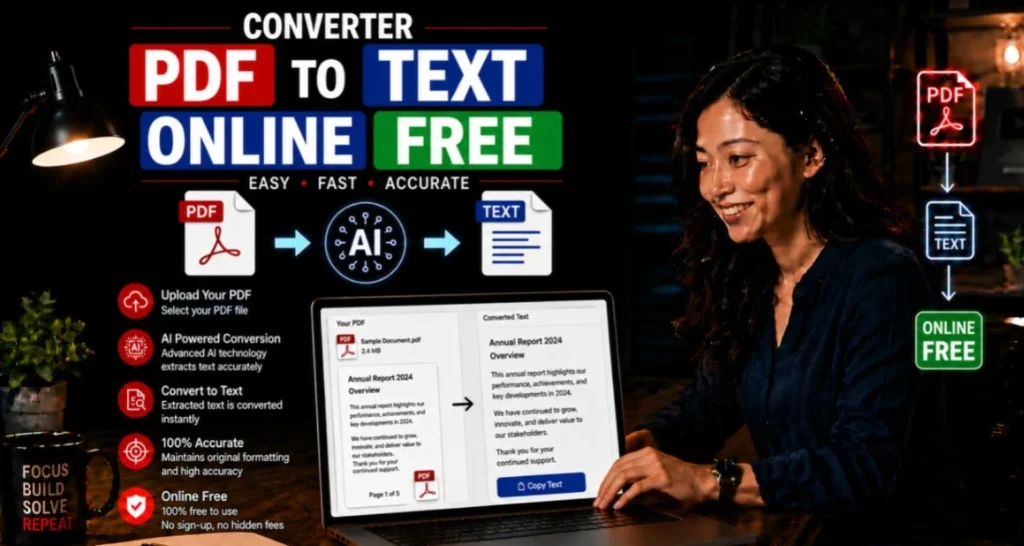
How to Convert PDF to Text Online Free: A Complete Guide to Free Tools
PDF files are everywhere. Contracts, ebooks, research papers, invoices, scanned forms almost every kind of document eventually ends up locked inside a PDF wrapper. That great for preserving layout and formatting, but it is a headache the moment you actually need to edit, copy, or reuse the text inside. This is exactly why so many people search for a reliable method for convert pdf to text online free every single day. Whether you are a student pulling quotes from a research paper, a writer repurposing old notes, or an office worker trying to extract data from a scanned invoice, knowing how to properly convert PDF files into plain text can save you hours of manual retyping.
In this guide, we will walk through why PDF to text conversion matters, how the process actually works, what to look for in a good converter pdf to text online free, and how to get clean, usable results every time without paying a cent or installing any software. By the end, you will know exactly why and which tool to pick and use for convert pdf to text online free with confidence, no matter what kind of document you are working with.
Why Convert PDF to Text?
PDFs can be viewed in the same manner on all devices making them ideal for sharing completed work. However, because they are designed this way, they are also very hard to edit. PDFs are typically formatted to have a set amount of text that is not selectable in many instances, characters are not even selectable, but rather the text is displayed as an image. If you ever attempted to select a paragraph from a PDF and copy and paste it somewhere and received garbled spacing, broken line breaks, or nothing at all, then you already know the drill and you have probably already searched for a way to convert PDF to text online free.
A good converter pdf to text online free can come in handy in such a situation. PDF to plain text removes all formatting jargon and leaves you with raw, editable text you can import into Word, Google Docs, a code editor, or a content management system. This is particularly beneficial for:
Taking a quotation or information for research or academic writing.
Providing text data for analysis, such as to AI tools, chatbots or language models.
Re-use of old scanned documents as digital archives.
Extraction of data from invoices, forms or reports in spreadsheets.
Making documents accessible to screen readers and assistive technology.
Whatever your use case, the goal is the same, you want to convert PDF to text online free without losing accuracy or spending money on desktop software.
How Does PDF to Text Conversion Really Work?
There are two types of online PDF to text conversion tools. The first type is for digitally-produced PDFs those that are made directly from Word or Google Docs and similar applications. These PDFs already have a text layer, so a converter just reads the text layer and puts it out as a plain .txt file. This type of conversion is typically instant and very precise, making it one of the easiest ways to convert PDF to text online free.
The second type concerns with documents that are scanned or image based PDF, where the text is really just a photo of text. A good converter pdf to text online free for these files requires Optical Character Recognition (OCR). OCR technology is used to recognize the shape of the text in the image, and then to guess what words and letters the text is representing, and finally output them as editable text. A good OCR software can read different languages, a number of fonts, and even a slightly slanted or poor quality scan.
It’s important to grasp the difference because not all free tools provide a good experience with scanned PDFs. In the event you’re only going to be working with digital PDFs, nearly any fundamental PDF converter will be fine. If you are using scanned papers, however, you’ll need a converter pdf to text online free product that plainly states it offers OCR support, as typical converters will fail silently to a blank or empty document with image based files. This is exactly why choosing the right tool to convert PDF to text online free matters more than people assume. Try convert PDF to text online free.
Is Your PDF Text-Based or Scanned?
Before you pick a method, find out which kind of PDF you have. It takes ten seconds. Try selecting or highlighting some text. If you can not, the document is probably a scanned PDF. You can also press Ctrl+F (Cmd+F on a Mac) and search for a word you can see on the page. If nothing turns up, there is probably no real text underneath, only a picture of it.
That matches how Adobe describes it, a paper document scanned to PDF contains only image data, and OCR is what adds searchable text. If your text highlights, you have the easy job. If it does not, you need OCR. The next two sections cover both cases.
If Your PDF Has Real Text
This is the easy case, and you may not need a converter at all. Select the text in your PDF reader, copy it, and paste it into Notepad, Word or Google Docs. We walk through Adobe Reader on Windows, Preview on a Mac and Word’s built-in PDF opener in our guide on how to copy text from a PDF document. If the pasted text comes out with broken lines, that is a formatting problem rather than an extraction problem, and we will fix it a text cleaner.
what makes a good free pdf to text converter?
There are many different options out there, and it’s important to know how to distinguish between an effective online free pdf to text converter and one that will waste your time. Here are some things to consider before uploading a confidential document, especially if you plan to convert PDF to text online free on a regular basis:
- The accuracy of the extraction of the text: The entire purpose of the conversion is to receive clean usable text. If you can scramble words and paragraphs around, merge them together, or lose a paragraph or section, what’s the point?
- The ability to have OCR for scanned files: As stated, some pdf to image converters will not be able to process a pdf with images. When it comes to documents that have been scanned, this is a must if you want to reliably convert PDF to text online free.
- Privacy and security: As you would be uploading your own or business documents, you want to find a tool that automatically eradicates files after they have been converted and those that employ encrypted connections.
- No requirements for software installation: One of the best things about Convert PDF to Text Online Free is the convenience it brings. That is as if the free tool is now going to force you to download a desktop app to convert pdfs to text, which is a point of using a browser based pdf to text converter online free in the first place.
- No hidden costs: Some services claim to be free of charge and then padlock some of the essential features behind a paywall after the initial use in effect, defeating the purpose of calling it a converter pdf to text online free in the first place.
At the end of the day, AI Text Extractor has almost all of features, you have found a genuinely reliable way to convert PDF to text online free no compromises, no hidden fees, no guesswork.
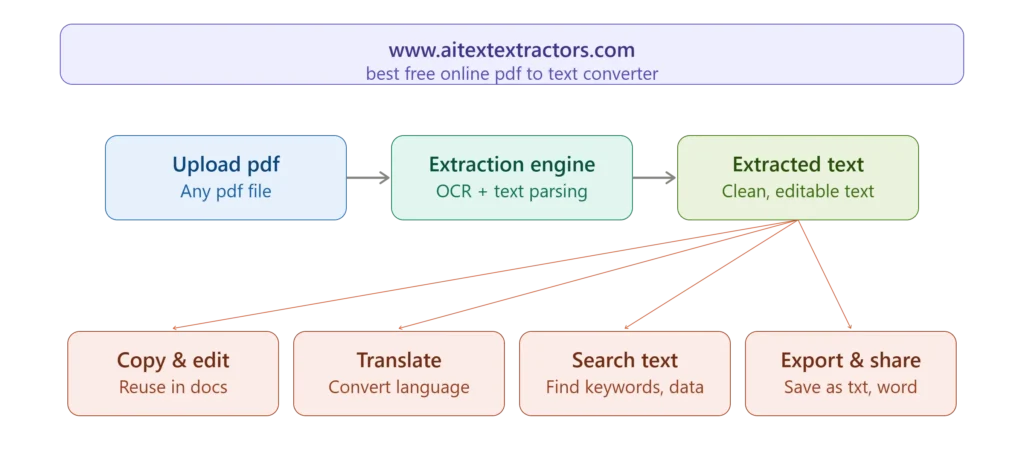
How to convert PDF to Text Online free Step by Step Guide.
If your PDF is scanned, or you would simply rather not copy it page by page, our free PDF to text extractor does the job in a few clicks, with nothing to install. It works on scanned pages as well as normal ones, so you don’t even have to work out which type you have first.
- Open the extractor and choose the PDF category, so the tool knows what to expect.
- Upload your file by dragging it in, or click Choose File.
- Click Auto Extract, or use Manual Extract (Crop) if you only need part of a page.
- If you chose manual mode, draw a box around the text you want and click Done Extracting.
- Wait for the text to appear in the editable box. Longer files take a little longer.
- Click Clear Garbage Text With AI to remove stray symbols and fix broken formatting.
- Use Copy Text or Download Text File to save the result.
- Manual mode is worth knowing about. Pages with headers, footers, sidebars or several columns can confuse any OCR engine, and cropping to the block you actually need keeps the output tidy. If a page has two columns, extract them one at a time so the text comes out in the right order.
- The AI button is optional, but we recommend it for scanned files, where stray marks are common. Read the result before you use it, because no cleanup is perfect, and check names, numbers and dates in particular. If your PDF is very long, check the limits shown on the tool before you upload it.
That is the whole process to convert PDF to text online free, and it works the same on a laptop or a phone.
Other Ways to Convert a PDF to Text
You have a few other options if you would rather not use an online tool. Microsoft Word can open a PDF directly and turn it into an editable document, which works best on simple, text-heavy layouts. We compare this route in more detail in our guide to a PDF to Word converter. Google Drive can run OCR for you: upload the PDF, right-click it and choose Open with Google Docs. It suits short, clean files.
Adobe Acrobat has OCR built in, and Adobe’s guide to recognising text in scanned PDFs has the current steps. It is a good choice if you already own it, or if you would rather keep confidential files on your own computer.
Common Mistakes When You Convert PDF to Text
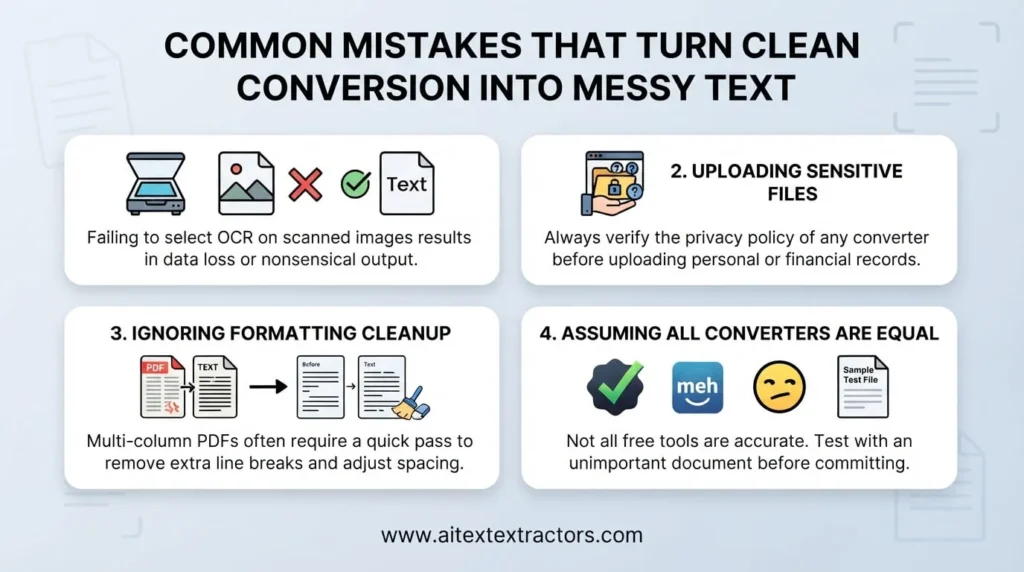
A few common mistakes that can turn a clean conversion into messy text
Avoiding OCR step: It is important to keep in mind that if your file is a scanned image and you do not select ocr, you will lose all the text in your file or the information may be nonsensical.
Uploading of sensitive files to unknown sites: Before uploading personal information, financial records or contracts, always check the privacy policy of a converter.
Ignoring formatting cleanup: When you converted the text some extra line breaks or paragraph spacing may have been inserted, particularly in multi-column PDFs this will require a quick pass of the converted text to remove the extra line breaks or to adjust the spacing between paragraphs.
Assuming all converters are equal: There are some truly accurate and fast free tools and others that do not. If you want to try out a document that you do not mind losing, do so before committing to a single service for important documents.
Fix Messy Text After You Convert a PDF to Text
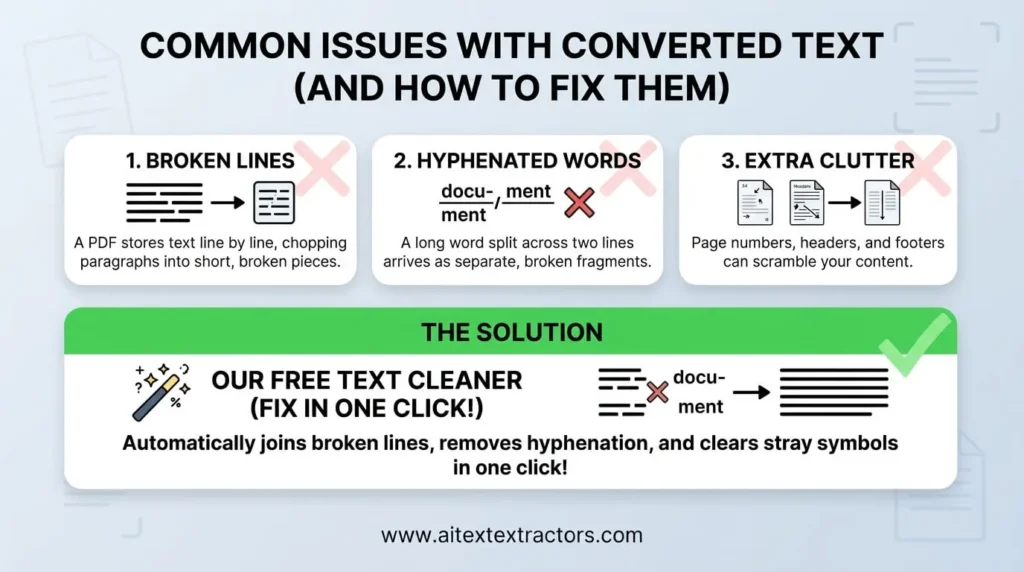
Even when every word is correct, converted text can look wrong. Three things cause most of it.
Broken lines: A PDF stores text line by line, in the shape of the printed page. Copy it, and every visual line becomes a separate line of text, so paragraphs get chopped into short pieces.
Hyphenated words: A long word split across two lines in the original, such as “docu-” and “ment”, arrives as two fragments.
Extra clutter: Page numbers, headers and footers can end up in the middle of a sentence, and multi-column pages may be read in the wrong order.
Our free text cleaner fixes most of this in one click by joining broken lines, removing hyphenation and clearing stray symbols. For a closer look at which options to use, see our PDF text cleaner guide.
Long PDFs and Locked PDFs
If your PDF runs to dozens of pages, process it in sections. It makes errors easier to spot and avoids hitting any limit a tool may have. For scanned files, quality matters more than length, Adobe notes that scanning at 300 dpi gives the best conversion results, and accuracy drops slightly at 150 dpi.
Some PDFs also restrict copying. That setting is usually the owner’s choice, often for copyright or confidentiality reasons. Only work with a file if you have the right to use its content, and if you need the text from a locked document, the cleanest route is to ask the owner for an editable version. This is general information, not legal advice.
What is the Privacy of Your PDF?
Before you convert PDF to text online free with any service, check its privacy policy and think about what’s inside the file.
With our tool, an uploaded PDF travels over an encrypted HTTPS connection to our server, where it’s processed only to extract the text, and it is not saved after the text is returned to you. If you use Clear Garbage Text With AI, the extracted text is sent to AI to be cleaned. Please avoid uploading highly sensitive documents such as ID cards, bank records or confidential contracts, and use an offline tool for those. You can read the full details in our privacy policy.
Where AI Fits In
Modern tools combine classic OCR with AI. OCR reads the characters, and AI helps clean up what comes out, fixing stray symbols, broken formatting and small recognition errors. If you would like to see how this changes the way people work with documents, read our guide to how AI converts PDF to text.
Free vs Paid: Do You Really Need to Pay?
For the vast majority of everyday users, a free converter pdf to text online tool is more than sufficient. Paid software or premium subscriptions typically add value through batch processing at scale, advanced OCR accuracy for handwriting or unusual scripts, API access for developers, or integration with cloud storage platforms like Google Drive and Dropbox.
If you are only converting a handful of documents occasionally, there rarely a reason to pay. Free tools have improved dramatically over the past few years, and many now offer OCR accuracy that rivals paid alternatives. The main trade off is usually speed and file limits during high-traffic periods, since free services often prioritize paying users during peak load. Still, for one-off tasks, a free converter pdf to text online free will almost always get the job done without any noticeable compromise in quality.
It is also worth noting that many so called premium features are simply conveniences rather than necessities. A converter pdf to text online free tool with a clean interface and reliable OCR can handle 95% of what most people need, and the remaining 5% large-scale automation or enterprise integrations is only relevant to businesses processing thousands of documents a day.
Practical Use Cases Where This Skill Comes in Handy
Knowing how to quickly use a converter pdf to text online free tool pays off in more situations than people initially expect:
- Students converting lecture slides or research PDFs into editable notes for easier studying and citation.
- Writers and bloggers extracting content from old PDF drafts to repurpose for new articles.
- Small business owners pulling text from scanned receipts or invoices for bookkeeping.
- Developers feeding extracted text into scripts, databases, or natural language processing pipelines.
- Researchers archiving old scanned documents into searchable digital text.
- Job seekers pulling text from PDF resumes to paste into online application forms that don’t accept file uploads.
Tips for Getting the Cleanest Results
A few small habits can dramatically improve the quality of your converted text:
Use high resolution scans when possible, since OCR accuracy drops significantly with blurry or low-contrast images.
Convert one section at a time for very long documents if the tool struggles with large files.
Always proofread OCR-generated text, particularly for names, numbers, and technical terms that are easy to misread.
Keep a backup of your original PDF in case you need to reconvert with different settings.
If a tool offers multiple output formats, test both .txt and .docx to see which preserves structure better for your specific document.
Where to Go Next
Each guide below goes deeper on one part of the topic:
How to Copy Text From a PDF Document: Adobe Reader, Preview, Word and OCR methods
Converter PDF to Text Word Tool: turning PDFs into editable Word files
How AI Converts PDF to Text: what AI changes about document work
PDF Text Cleaner and Text Cleaner: fixing broken lines and symbols
How to Extract Text from Image Online: the same idea for screenshots and photos
Frequently Asked Questions
Can I convert PDF to text online free without signing up?
Yes. Our tool does not ask you to create an account. Upload the file, extract the text, then copy it or download it.
Does it work on scanned PDFs?
Yes. Scanned PDFs need OCR, and the tool reads scanned pages as well as normal ones.
How do I keep the formatting?
Plain text can’t hold columns, tables or fonts. If you need the layout, convert to Word instead, and use plain text when you only need the words.
Why does the copied text have strange line breaks?
PDFs store text line by line rather than as flowing paragraphs. A text cleaner joins the lines back into proper paragraphs.
Is it safe to upload my PDF?
It depends on the service. Read its privacy policy, and keep confidential documents on your own device.
Pick Your Path
If you can select the text in your PDF, copy it and run it through the cleaner. If you can’t, it is scanned, so upload it to the free extractor and choose the PDF category. If it is confidential, use an offline tool. Whichever route you take, you can convert PDF to text online free in a few minutes.
Read next:
How to Extract Text from Image Online