ChatGPT create a Signature: Can AI Really Create Your Signature?
Type “make me a signature” into ChatGPT, and in seconds, you will receive one that looks fantastic with a flowing, cursive style, perhaps even a flourish under the very last letter. You can get lazy about it and simply save it, drop it on a contract and do it.
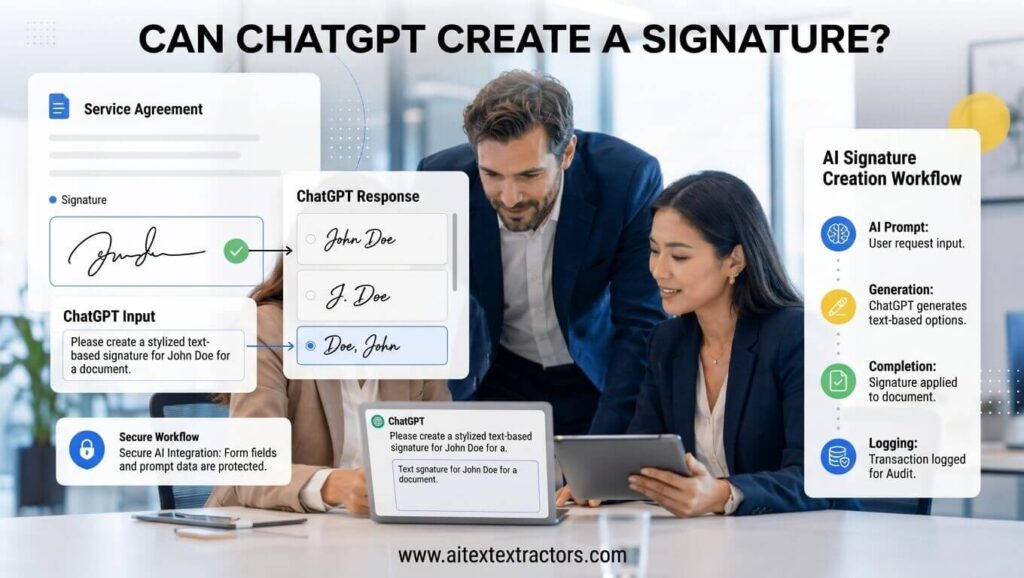
But hold on. Is this the way your signature looks? Would any of them accept it? In this article, we will look at what a ChatGPT create a Signature really is, what it can and cannot do, and what to use instead when you need a signature for real documents. If you landed here with the short version of the question, “can ChatGPT create a signature?”, the honest answer is yes and no, and the details matter a lot. If you would like to see how real signature images are prepared first, our complete guide to extracting a signature from an pdf and image is a good place to start.
What People Mean by a ChatGPT create a Signature?
It is used in three very different ways and most of the confusion arises from blending them.
- A signature-style design. Your name or initials written in a script font or created as an image.
- An email signature. The bottom section of the email message that includes your name, job title and phone number. These tend to be primarily text-based, so ChatGPT might be pretty good at writing these.
- Your real, handwritten signature. One that you really sign, converted to a digital version.
This article will cover the first and third that are where people get stuck. When someone says they want a ChatGPT create a Signature for a contract, they almost always mean the first kind and hope it will work as the third.
Can ChatGPT Create a Signature?
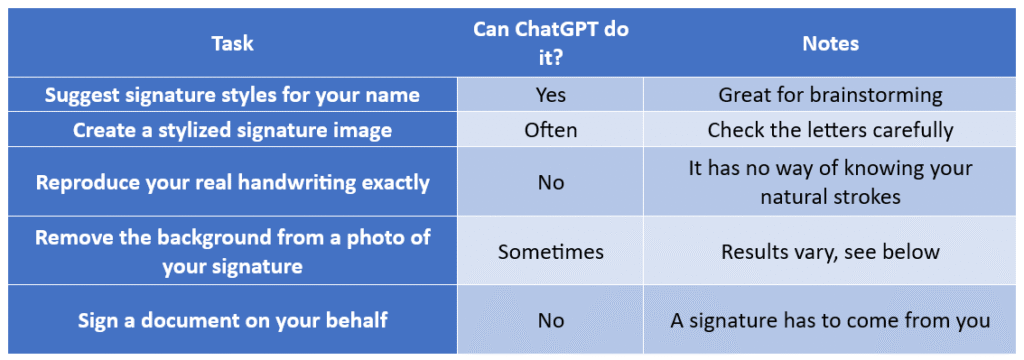
To a certain extent, yes. It can create signature style designs, cursive lettering of a name, initials in various styles, even a picture that resembles ink on paper. Cannot do your signature, the one that you have formed with your hand over the years without thinking.
A real signature is a habit. It is your speed, your slant and how you are always rushed the last few letters. A tool that does not know you could only guess. If you upload a sample it will try to copy not capture. That is why ChatGPT create a Signature will always be a signature-style design, not a record of how you actually sign.
What a ChatGPT create a Signature Looks Like in Practice?
You will get one of two answers, one is that the person will agree to sign it, and the other is that they will create a picture of your name. Both can appear well-done. Both have issues.
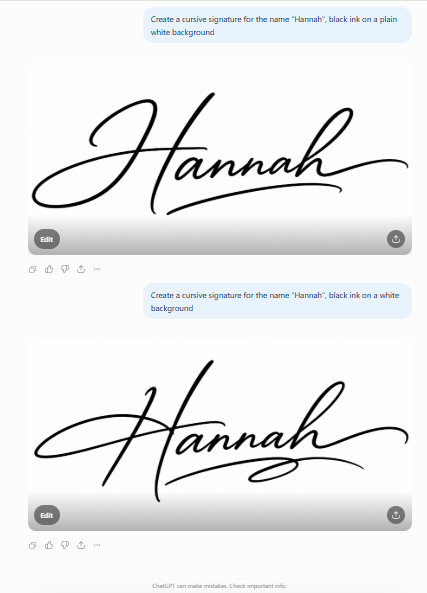
It is not consistent: You will most likely obtain 2 various designs if you ask the same question twice. That is not the idea of a signature, after all, for it should be consistent.
It can get your name wrong: AI image tools sometimes garble letters or swap them around, especially with less common names. Your name is the one word that must be right, so a ChatGPT create a Signature that spells it slightly wrong is worse than having no signature at all.
It looks generic: AI cursive designs are typically clean and neat, which is something that human signatures often are not. Everyone who has ever seen someone else’s true signature knows how personal and messy it typically is.
Why an AI-Made Signature Is not Really Yours?
There are three pragmatic reasons to take precautions.
- Matching: Some organisations look for a match between your signature and that on your ID or older documents. A design that is not similar to your real signature can lead to complications later on.
- Habit: There are no signs of a signature that has never been practised. If he/she asks you to sign something in front of him/her, your signature will not look like the picture on your laptop.
- Intent: Legal weight generally comes from your intention to sign and the rules for that type of document, not from how pretty the signature looks. In the US, for example, the ESIGN Act says that a signature or contract cannot be denied legal effect simply because it is in electronic form. That is about the act of signing electronically, not about artwork. DocuSign has a useful explainer on electronic signature laws if you want to read more.
So, when ChatGPT create a Signature is not automatically valid or invalid. What matters is that you meant to sign, and that the person receiving the document accepts the method.
Can ChatGPT Remove the Background from a Signature?
Sometimes, it depends on how you ask. Upload photo of your signature and request one that has a transparent background. In reality it is a mixed record.
There was also a report on the OpenAI Community forum stating that ChatGPT is creating a checkerboard background even if the prompt is highly specific. Others in the same discussion stated they found a way around it. On the other hand, OpenAI’s image editing API also has the feature to ask for a transparent background, but this is a tool for the developers and not for the users.
A printing guide is saying the same thing: A checkerboard pattern is not a true indicator of transparency of a file. The image can just be drawn a checkerboard pattern in it.
To get a clean ChatGPT create a Signature file, then test for a real transparent background by putting it on a colored shape in Word or Google Docs. If it is white or grey, it is not transparent. Sometimes thin strokes can become softened or broken while being drawn, so zoom in on those strokes. For a full explanation of what a proper file looks like, see our guide to getting a signature transparent background.
Try This 3-Minute Experiment Yourself
Reading is fine, but seeing the problem with your own eyes is better. Try these three steps, use a sample signature, not the one on your bank forms.
Type on ChatGPT: “Create a cursive signature for the name [your name], black ink on a plain white background.”
Ask the exact same thing again, and compare the two results. Do they match?
Upload a photo of your own sample signature and ask: “Remove the background and give me a transparent PNG.” Then place the result on a colored background.
Finally, compare your ChatGPT created Signature with your real handwriting and with a version from a signature extractor. Most people find the difference obvious within a few seconds.
A Safer Route: Turn Your Own Handwriting into a Digital Signature
If you need a signature for documents, forms or contracts, start with your own hand. This only takes about 5 minutes and it is a onetime setting.
Use dark-colored pen to sign on plain white paper. Write slightly larger in size so thin strokes are not lost when re-sized.
Photograph or scan it in even light, with the phone held directly above the page. Our guide on how to scan your signature with your phone covers the details.
Upload it to a signature extractor such as our free signature extractor to remove the paper background.
Save output as PNG, not a JPG
Check it on a colored background and zoom in on the edges.
Once you have the file, you can add the signature to a PDF without printing or insert it in Word and Google Docs. This route gives you a file that matches your real handwriting, which a ChatGPT create a Signature cannot promise.
ChatGPT Signature V/S a Signature Extractor
In short, a ChatGPT create a Signature is a starting point for ideas, while an extractor is a starting point for your real file.

When an AI-Made Signature Style Is Actually Useful?
None of this means AI is useless. AI can perform some tasks well. Only if no one confuses the outcome with the real thing.
- Brainstorming a style: If you are a student creating your signature ask AI for six variations of your initials. Choose one you like practice it on paper until it feels natural then scan it. A ChatGPT create a Signature can serve as a good style reference. You are the one who signs it.
- Templates: Placeholder signatures on a sample letter, a presentation or a template are harmless because no one relies on them.
- Creative work: Handwriting‑style logos, posters and branding can freely use lettering.
- Email footers: A text‑based email signature that lists your name, title and phone number is a job, for AI.
Prompts That Help Without Putting Your Real Signature at Risk
When used this way, a ChatGPT Create a Signature prompt can help you save time while not risking exposure of your signature. Here are four prompts that will do the trick:
- Recommend five styles of signature for the initials A.K. that are easy to write.
- Giving suggestions to make my signature more legible when photographed using a smartphone.
- Provide a checklist for taking a photograph of my signature written on white paper.
- Create an email signature block with my name, designation, and telephone number.
Note that none of the prompts asks the AI to sign something or mimic your handwriting.
Privacy: Think Before You Upload Your Signature
Your signature is personal data. Even the seemingly innocuous ChatGPT create a Signature test may require uploading an actual handwriting sample, so it makes sense to spend a couple of seconds considering it.
Before you upload your sample, make sure that you familiarize yourself with the data settings of the service you use. See how uploaded files are stored and whether they are used to train models. Settings vary depending on a plan and change with time, so it’s better to check the current one rather than rely on some blog posts (including this one). There are a few practices that can help you:
- Do not use your real signature to experiment but choose some sample signature.
- Store your signature file in a personal folder.
- Delete unnecessary files.
- Think about third-party tools. Some bots labeled “signature generator” are created by other developers, so it’s worth seeing what information they request.
Is a ChatGPT create a Signature Legal?
It all depends on the document, country, and what the recipient will accept, not the party or thing responsible for signing the document. Some agreements allow electronic signatures without any problem, while some others require a manual signature, notary or certified digital signature. For instance, in the US, the law on electronic signature identifies some exceptions like wills or testamentary trusts.
This is because a ChatGPT create a Signature that is attractive is not necessarily proof of anything. If the document is important, you should ask the organization receiving the document what they require.
Frequently Asked Questions
Can I use a ChatGPT create a Signature on a contract?
Yes, but only if the other party agrees, and it is not your actual signature. For anything serious, it is better to use your handwritten Signature converted into a clean digital format.
Can AI create a signature?
Yes, AI technology is able to create Signature designs and recommend signatures styles, but it will not be your signature since they have never seen you signing your name.
Can ChatGPT remove the background from my signature?
Sometimes. Results vary, and some users report fake transparency. If you try it, check that your ChatGPT create a Signature file really is transparent by placing it on a colored background.
Is copy and paste of my signature considered illegal?
It is fine to sign my own documents using my signature. Copying someone else’s signature on the document without the person’s consent may be considered forgery or fraud in many countries, so better don’t do it. It is general information but not legal advice.
What is the recommended way of obtaining a signature which looks like mine?
I should sign on the white paper, scan or take a picture, and pass it to the signature extractor to obtain a transparent PNG.
Is it safe to use a ChatGPT create a Signature generator?
It depends on the tool. Read what data it asks for, avoid uploading your real signature to unknown bots, and check the privacy settings of the service you’re using.
Which Option Should You Take?
Here is a quick way to decide whether a ChatGPT create a Signature or your own handwriting suits the job:
- Signing a contract or an ID-linked document: Use your own handwriting, digitized.
- Uploading a signature to an online form: Use your real signature, in the format the form asks for. (See our application form signature guide).
- Designing a mockup, template or poster: An AI-made style is fine.
- Choosing a new signature style: Use AI for ideas, then practice by hand.
- Email footer: A text-based signature, no image needed.
Ready to turn your own handwriting into a clean file? Upload a photo to our free signature extractor and get a transparent PNG in a few seconds.
Read next:
The Complete Guide to Signature Extraction from Images