How Is This Tool Different from Other Signature Extractor
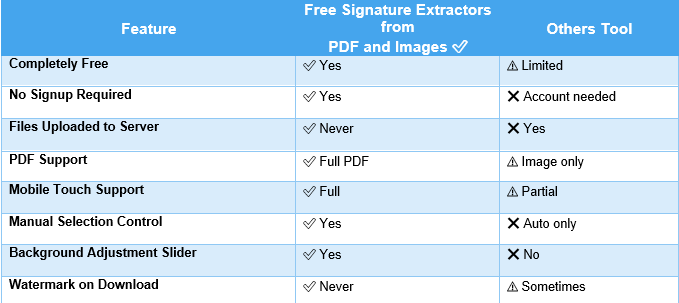
Not all signature extractors are created equal. The majority of online converters require you to give up your privacy, pay premium rates or receive low-quality images. What differentiates this tool from the others is:
1.Complete Privacy – 100% Client-Side Processing
Most online conversion tools require you to upload sensitive legal documents, contracts, and ID scans to their remote servers to be able to process them. Our tool is built on a zero-upload architecture. Processing is done locally inside your web browser using HTML5 and client side web technologies. Send files of any size, without touching our servers, so your sensitive documents are 100% private, 100% secure.
2.Clear PNG Output
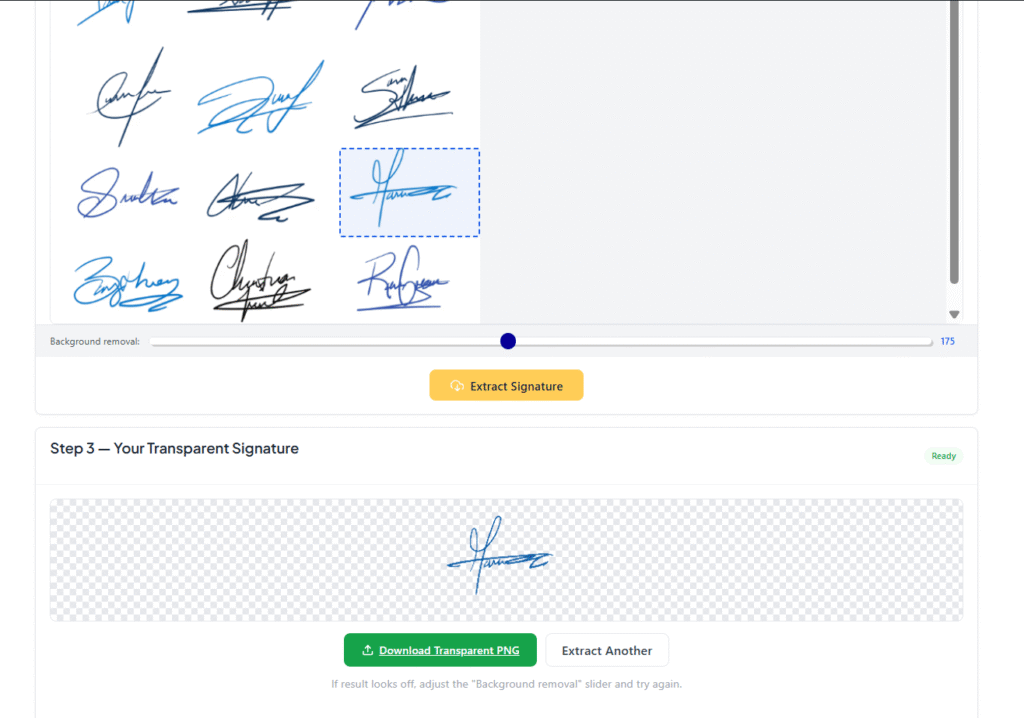
Generic background removers leave rough white borders or pixelated edges or leftover paper texture. Our tool extracts only the pixels of the ink to give you a true alpha-transparent PNG. When you paste your extracted signature into Microsoft Word, Adobe PDF or Google Docs, it sits perfectly on top of text lines and tables without that distracting white background block.
3.Multi-Page PDF Viewer
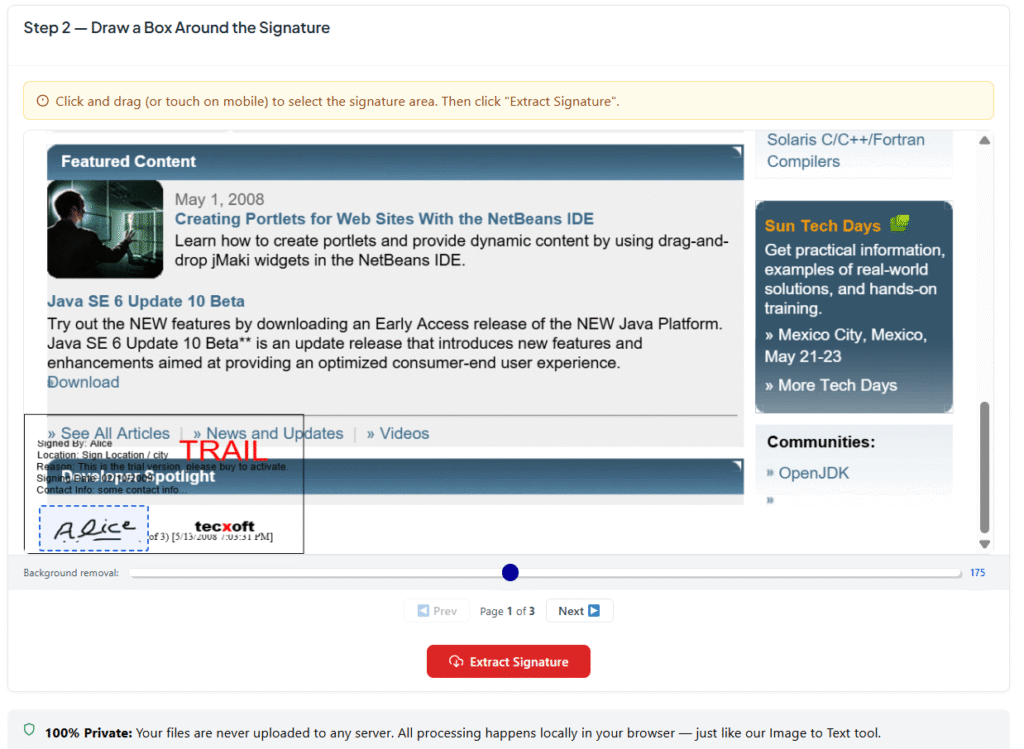
Unlike simplistic image-only background removers, our tool easily handles complex multi-page PDFs. No need to split or convert your PDF to image files first. Upload your document, go to the specific page and crop the signature then extract it in no time.
4. Intelligent Fine-Tuning Control (Background Removal Slider)
Paper conditions are rarely ideal, poor lighting, shadows and coloured paper often make automated extractions fail. We offer a live interactive Background Removal Slider so you can adjust the sensitivity live. Regardless of whether you signed with a light ballpoint pen or a thick felt marker, you get maximum stroke detail without the noise.
5.Fast & Friendly
No server-side queuing, no API delay, no network upload bottlenecks – extraction is near in one second. It works fine even on slower connections and older mobile devices.
Who Should Use This Signature Extractor?
Whether you want to copy free signature from image, extract a wet signature from a scanned contract, or get a transparent PNG from a PDF online — this tool is built for you.
Freelancers & Remote Workers
Extract your handwritten signature once and reuse it on every client contract, invoice, and agreement — without printing and scanning every time.
Legal Professionals
Lawyers and legal teams who need to extract signature from scanned document for use in new agreements or to verify an existing signature digitally.
Real Estate Agents
Quickly digitize client signatures from property documents and reuse them across multiple forms without repeated signing sessions.
Students & Teachers
Add your signature to university forms, thesis submissions, teacher reports, and academic documents without visiting an office in person.
Small Business Owners
Create a digital version of your business signature to use on quotes, proposals, and supplier agreements — save hours every week.
Mobile-Only Users
Take a photo of any signed paper document and extract the signature from image directly on your phone — no desktop or app installation required.
The Easiest Way to Extract Signature from PDF or Image Online — Free
If you are looking to free extract signature from PDF online, copy signature from image, or get a transparent signature PNG from a scanned document — this is the fastest and most private tool available. No registration. No payment. No file uploads to any server. Just upload, select, and download in seconds. Our Ai Image and PDF text extractor is also easy to use secure and Free. for Further Query feel free to Contact Us.
Common Mistakes People Make When Trying to Extract a Signature from PDF and Images online
Many people struggle to get a clean result when they first try to use a free signature extractor from PDF and images online. Understanding these common mistakes will help you get the best possible output every time.
1. Using a blurry or low-resolution photo is the most common issue. When you take a photo of a signed document, make sure the image is sharp, well-lit, and taken from directly above — not at an angle. A tilted or blurry photo makes background removal difficult and leaves noise around the signature edges.
2. Selecting too large an area when drawing the crop box is another frequent mistake. The more background you include in your selection, the harder it is for the tool to separate the signature from the paper. Draw your box as tightly as possible around just the signature itself.
3. Not adjusting the background removal slider when needed is a mistake many users make. If your document has a cream, grey, or yellowish paper background instead of pure white, the default slider setting may not remove it completely. Simply drag the slider to the right until the background becomes fully transparent.
How to Get the Best Results from This Free Signature Extractor from PDF and Images online
Follow these simple tips every time you use this Free Signature Extractor from PDF and Images online to guarantee a clean, professional-looking transparent PNG:
Tip 1 — Use Good lighting
if you are photographing a signed paper document, always use natural daylight or a bright lamp. Shadows across the signature make background removal much harder and leave grey patches in the final output.
Tip 2 — Photograph Directly from Above
Place your document flat on a table and hold your phone or camera directly above it. Avoid angles — even a slight tilt distorts the signature shape and makes the extracted result look uneven.
Tip 3 — select Only the Signature
When drawing your selection box, aim to include only the actual ink of the signature — not the surrounding white space, nearby text, or page margins. A tight, precise selection gives you the cleanest transparent PNG.
Tip 4 — Adjust the Slider for Dark or Coloured Paper
If your document is printed on non-white paper — cream, light yellow, or light grey — move the background removal slider to the right until all background color disappears while keeping the signature ink intact.
Tip 5 — Use PDF Directly Instead of Screenshots
If you have a PDF contract or agreement, upload the PDF file directly into this Free Signature Extractor from PDF and Images online instead of taking a screenshot of it. Direct PDF upload always gives sharper results than a screenshot because no image quality is lost in the process.
Why a Transparent PNG Is the Best Format for Your Extracted Signature
When you use a free signature extractor from PDF and images online, the output is always a transparent PNG and this is intentional. Here is why PNG with transparency is the ideal format for digital signatures:
A JPEG file always has a white or colored background — it does not support transparency. If you extracted your signature as a JPEG, it would show a white rectangular box around it whenever you placed it on a colored document or form. This looks unprofessional and is immediately obvious.
A transparent PNG has no background at all. The pixels surrounding your signature ink are completely invisible, which means your signature blends seamlessly onto any document — white paper, colored forms, dark backgrounds, or even images. It looks exactly as if you signed the document directly with a pen.
This is why every download from this Free Signature Extractor from PDF and Images online is automatically saved as a transparent PNG, to give you the most professional, versatile result possible every time.
How This Free Signature Extractor from PDF and Images online protects Your Privacy
Privacy is a genuine concern when dealing with signed legal documents, contracts, and personal agreements. Most online tools require you to upload your files to a remote server — where your documents could theoretically be stored, accessed, or processed by third parties.
This Free Signature Extractor from PDF and Images online was built with a fundamentally different approach — a zero-upload architecture.
What zero-upload means for you:
Every step of the process — reading your file, rendering the PDF pages, processing the selected signature area, removing the background, and generating the transparent PNG — happens entirely inside your web browser on your own device. No data packet containing your document is ever transmitted over the internet to any server.
This means:Your signed contracts are never stored on any database.
Your personal documents cannot be accessed by anyone else.
Your signature image is generated locally and downloaded directly to your device.
Even if the website went offline after you uploaded your file, the tool would still work because it runs in your browser.
This level of privacy is particularly important for legal professionals, healthcare workers, financial advisers, and business owners who regularly handle sensitive confidential documents. With this free signature extractor from PDF and images, you never have to worry about document security.
Why Handwritten Signatures Still Matter in a Digital World
In an era of DocuSign, electronic signatures, and digital authentication, you might wonder why anyone still needs to extract a handwritten signature from a PDF or image. The answer is simple, handwritten signatures remain legally required or strongly preferred in many situations worldwide.
Many countries and legal systems still require a wet signature an actual handwritten mark for certain document categories including property deeds, wills, court documents, notarized forms, and some financial agreements. In these cases, a scanned or photographed handwritten signature is the accepted digital equivalent. Beyond legal requirements, handwritten signatures carry a personal authenticity that typed names or digital certificates cannot replicate. A handwritten signature on a business proposal, a personal letter, or an artist’s print creates an immediate sense of trust and personal connection that electronic alternatives simply do not match.
This is why the Free Signature Extractor from PDF and Images online continues to be one of the most practically useful tools for modern professionals — bridging the gap between the physical act of signing and the digital world where documents live and travel.
Try our other free tools: Free Content Analyzer Tool And AI Image to Text Extractor