
Free AI Image/PDF To Text Extractor
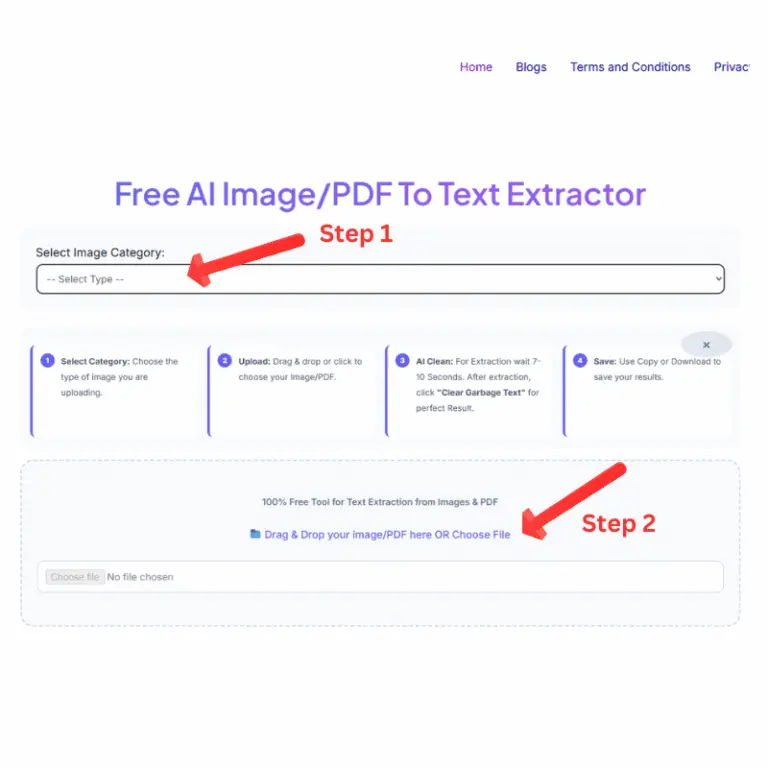
Select Category: Choose the type of image you are uploading.
Upload: Drag & drop or click to choose your Image/PDF.
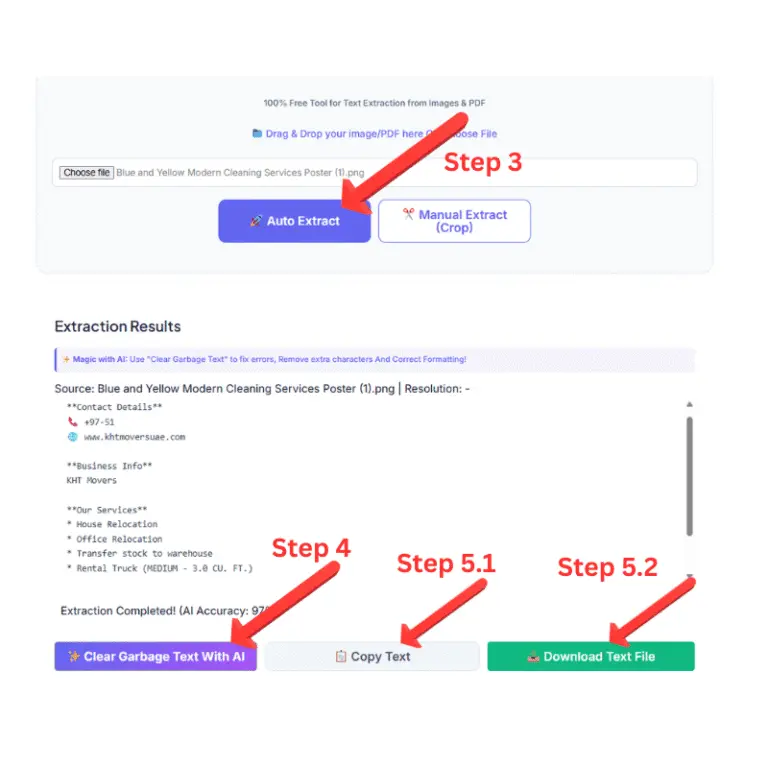
AI Clean: For Extraction wait 7-10 Seconds. After extraction, click "Clear Garbage Text" for perfect Result.
Save: Use Copy or Download to save your results.
100% Free Tool for Text Extraction from Images & PDF
📁 Drag & Drop your image/PDF here OR Choose File
Crop the Text Area
Processing your request...
Extraction Results
✨ Magic with AI: Use "Clear Garbage Text" to fix errors, Remove extra characters And Correct Formatting!
AI Image PDF to Text Extractor: Turn Any Visual Into Editable Text in Seconds
In today’s fast-paced digital world, information doesn’t always come in a convenient, editable format, it often lands in your hands as an image, screenshot, a scanned page, or a locked PDF. This is where our AI image pdf to text extractor come. A high performance digital solution that is specially designed to connect static visual data with editable digital content so you never have to retype another paragraph again.
Our engine at AI Text Toolkit has been engineered using state-of-the-art Optical Character Recognition (OCR) technology and advanced deep learning algorithms, which are able to perform the highest accuracy of character recognition from any image or PDF. As opposed to simple conversion solutions, which struggle with fonts, low-quality images or thick composition, our AI image PDF to text extractor Tool is speedy and precise. Within a minute, it can convert screenshots, social media images, and even detailed multi-page PDF documents into purified, instantly usable text with no formatting issues, no garbled output, just accurate results that you can copy, edit and use immediately.
From professional data entry to digitizing documents or simply capturing content for your next social media post, our AI image PDF to text extractor Tool streamlines your workflow with a simple click, saving you hours of manual typing. It is designed for practical, real-world applications instead of clean, flawless documents, so it works as expected on messy, everyday images that people use in their work.
Text can be extracted from almost any image such as a regular image, a WhatsApp status, an Instagram status, a Twitter (X) feed image, a Pinterest image post, or even a screenshot from a PDF or MS Word document. Our AI image PDF to text extractor Tool can extract text from PDF images flawlessly, regardless of the location.
Best of all No catch. No subscription, credit card information or secrets asked. We don’t want to attach a paywall to our powerful tools, so our AI image PDF to text extractor is 100% free for all users.
How to use our Free AI Image PDF to Text Extractor
Whether you need to remove text from an image or a PDF without any hassle, our free AI Image PDF to Text Extractor aims to make the entire process simple and easy. With just a few seconds to get started, drag and drop your file or pick from your device, then choose your desired category (PDF, Social Media Post, etc.) to let the AI Image PDF to Text Extractor Tool know exactly how to process your content. After the choice, click Auto Extract, and it will do the rest. In the background, our AI Image PDF to Text Extractor Tool will work on the document using state-of-the-art OCR technology, and that takes a relatively short amount of time, even for longer PDFs. The AI Image PDF to Text Extractor Tool has been designed to preserve all the data without losing any without compromising your original formatting. The outputs are precise and instantly available text that you can use right away, no manual retyping or guesswork — no need for you to do any of that work; AI Image PDF to Text Extractor Tool does it quickly and accurately for you.
Our Unique Edge: AI-Powered Text Refinement
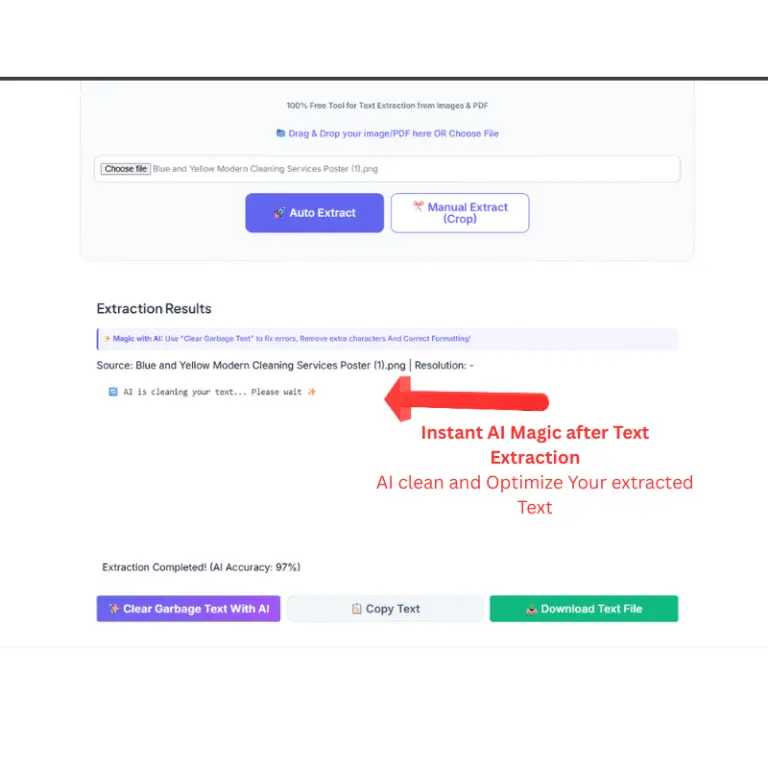
There are many tools out there that can convert an image or PDF to text, but most of them end there, spitting out raw, messy output, and letting you do the cleanup. What truly sets our AI image PDF to text extractor Tool apart from other extractors is what happens after the initial extraction. When dealing with low-quality screenshots or overcrowded PDF pages, standard OCR engines tend to generate garbage characters, break symbols, miss line breaks and miss formatting. With the built-in AI Clean feature, our AI image PDF to text extractor Tool automatically scans the extracted text output and removes these common errors instantly, providing you polished text content that is ready for use, without being a jumbled draft that requires manual fixing.
But we didn’t stop there. If your text is cleaned, our built-in Smart Editor allows you to edit, format and improve the text directly on the page without copying everything into a separate word processor to edit a small part of the text. You can resize the spacing, correct any remaining inconsistencies or reformat the text exactly the way you want, from the same seamless interface. This includes the entire process, from raw image to clean, editable, and publish-ready text, all within a single tool a feature that sets our AI image PDF to text extraction tool apart from traditional image PDF to text converters.
Most of the websites, which are competing with this are providing only one step of extraction and one way for cleaning and editing the page. From office documentation and cleaning up a scanned report to creating content for social media, our AI image PDF to text extractor offers a workflow experience that is more than just a simple tool and more like a comprehensive text processing assistant: accurate, quick and, let’s face it, delightful to use.
Pro-Tips for 99% Extraction Accuracy
Ensure your image or PDF has good quality and good contrast and ensure the text is clear. Dark or blurry images may lead to errors. For the best results with our Free AI Image PDF to Text Extractor, use high-contrast images to achieve 99% accuracy.
Where Can You Use This AI image pdf to Text Extractor?
The versatility of a high-performance AI Image PDF to Text Extractor makes it an essential tool for almost every digital workflow. At Text ToolKit, we have optimized our OCR engine to serve a wide range of professional and personal use cases with 97% accuracy. Here is how you can leverage our technology to save hours of manual data entry:
Digitalizing Corporate Documents: Businesses often deal with physical paperwork, scanned receipts, and printed invoices. Instead of retyping everything, you can use our AI Image PDF to Text Extractor to instantly convert these static documents into searchable and editable digital files. This is perfect for maintaining digital archives and organizing office records efficiently.
Academic Research and Study Material: Students and researchers frequently find valuable information in textbook screenshots or library PDFs that are locked as images. By uploading these files to our system, you can extract the exact text you need for your assignments, thesis, or presentations within seconds. It eliminates the struggle of copying long paragraphs from non-editable sources.
Data Entry and Spreadsheet Automation: Handling large data tables found in image files or complex PDF layouts can be a nightmare. Our tool allows you to extract rows of data from screenshots and paste them directly into Excel or Google Sheets. This automation reduces the risk of human error and significantly speeds up your data processing tasks.
Social Media Management: Content creators often need to save quotes from Instagram stories, captions from Pinterest images, or text from Twitter screenshots. Our AI Image PDF to Text Extractor helps you grab that text instantly, allowing you to repurpose viral content or save important information for your next post without any hassle.
Legal and Financial Record Keeping: Lawyers and accountants often work with old scanned documents that are difficult to navigate. Converting these images into clear text makes it easier to search for specific keywords or clauses, making legal research much more streamlined and productive.
Extracting Contact Information from Ads: Found a great service on a digital banner or a flyer? Instead of typing out the email addresses, phone numbers, or URLs, simply take a screenshot and let our AI Image PDF to Text Extractor do the work for you. It’s the fastest way to save business leads and contact details directly from visual advertisements.
Your Privacy, Our Priority
Unlike other online converters, AI Text Toolkit operates on a zero-log policy. Your uploaded images are processed in real-time and are Never stored on our servers. Once you close the tab, your data is gone forever, no registration, no tracking, just pure utility.
Why Our Tool is better than others?
Most online OCR tools are cluttered with intrusive ads and require hidden subscriptions. Our AI text extractor is built on a User-First philosophy. We use a combination of Tesseract and proprietary AI models to ensure that even low-quality images are converted into high-quality text. Whether it is a png/jpeg text extractor need or a complex ai pdf text extractor task, our tool handles it without compromising your data privacy.
Frequently Asked Questions (FAQs)
Q1: Is the AI Image PDF to Text Extractor completely free to use?
Yes, our AI Image PDF to Text Extractor is 100% free for all users. Unlike other premium tools, we do not require any registration, credit card details, or hidden subscriptions. You can upload and process as many files as you need without any daily limits.
Q2: How accurate is the text extraction from blurry or low-quality images?
At Text Toolkit, we use a high-performance OCR engine that delivers up to 90% accuracy even on standard quality scans. For the best results, we recommend using high-contrast and high quality images and pdf. However, if there are minor errors, you can use our unique AI Clear garbage feature to instantly polish the results.
Q3: Can I extract text from multi-page PDF documents?
Absolutely! Our AI Image PDF to Text Extractor is specifically engineered to bridge the gap between static visual data and editable text. Simply select the PDF category from the dropdown menu, upload your document, and our system will process the content while maintaining the original formatting of your file.
Q4: Is my uploaded data secure on your servers?
Privacy is our top priority at AI Text Toolkit. We operate on a strict zero-log policy, meaning we never store your images or the extracted text on our servers. Your data is processed in real-time and is permanently deleted the moment you close your browser tab.
Q5: What makes this tool different from other online OCR converters?
Most tools only provide raw, messy text. Our AI Image PDF to Text Extractor offers an all-in-one workflow where you can extract, clean, and edit your text within a single interface. With our Smart Editor and Clear Garbage features, you get a professional-grade output that is ready for immediate use.