
Free AI Image/PDF To Text Extractor
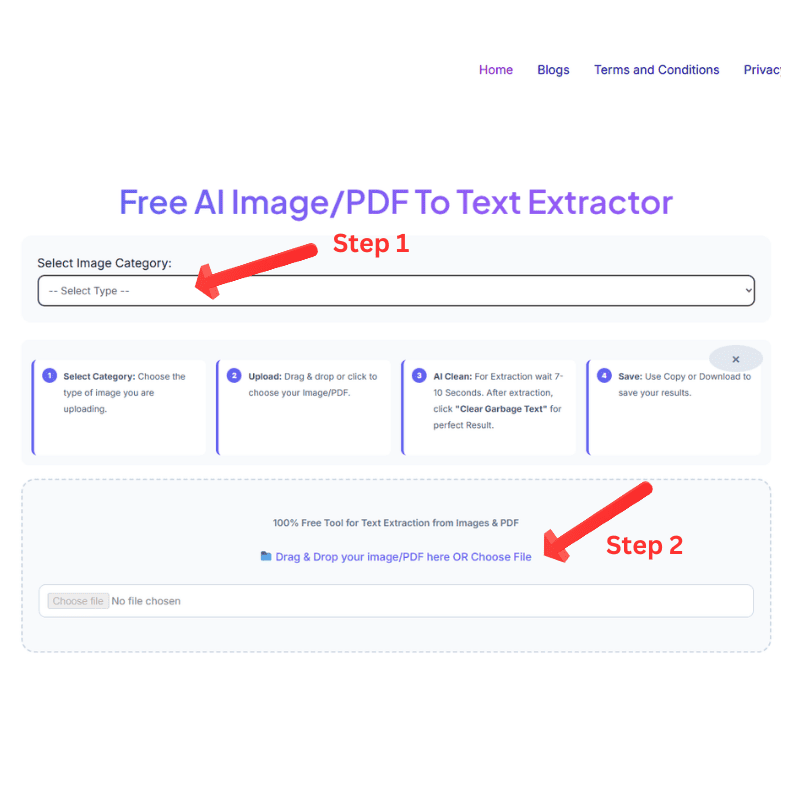
Select Category: Choose the type of image you are uploading.
Upload: Drag & drop or click to choose your Image/PDF.
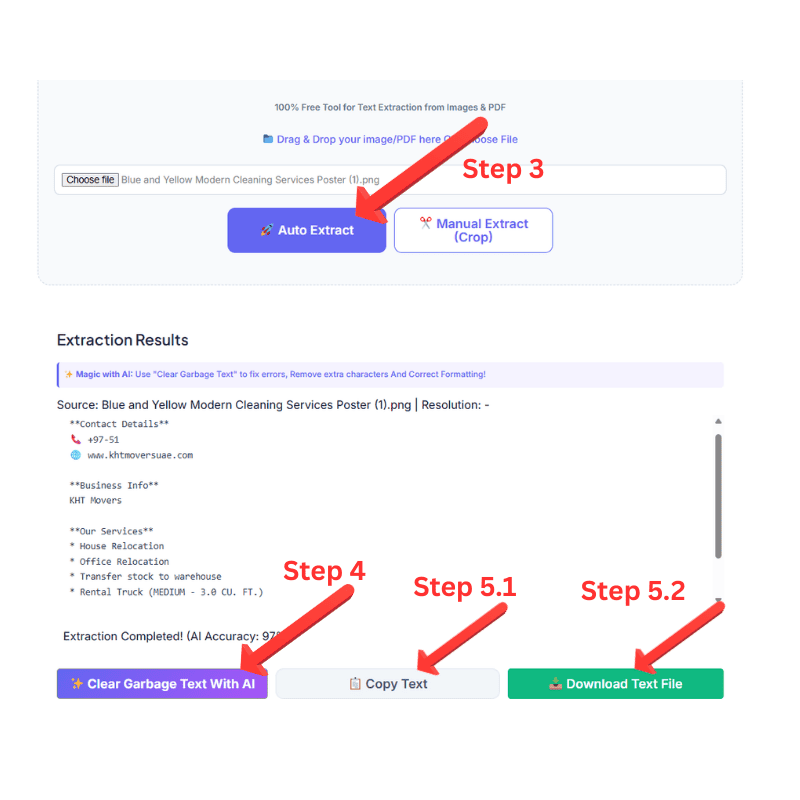
AI Clean: For Extraction wait 7-10 Seconds. After extraction, click "Clear Garbage Text" for perfect Result.
Save: Use Copy or Download to save your results.
100% Free Tool for Text Extraction from Images & PDF
📁 Drag & Drop your image/PDF here OR Choose File
Crop the Text Area
Processing your request...
Extraction Results
✨ Magic with AI: Use "Clear Garbage Text" to fix errors, Remove extra characters And Correct Formatting!
What is an AI image PDF to Text Extractor?
AI image PDF text extractor is a high performance digital solution specifically engineered to bridge the gap between static visual data and editable digital content. At AI Text Toolkit, our engine utilizes cutting edge Optical Character Recognition (OCR) and deep learning algorithms to scan and identify characters from any image or PDF with Maximum accuracy. Unlike basic conversion tools, our system is optimized for speed and precision, allowing you to within a minute transform screenshots, social media posts, and complex PDF files into clean, usable text. Whether you’re managing professional data entry or simply making posts for social media, our ai image or PDF text extractor ensures a seamless, one-click workflow that saves you hours of manual typing.
You can extract text from Image, WhatsApp status, Instagram stories Screenshot, Twitter feed Screenshot, Pinterest image, or even from the screenshots of PDF or MS Word. We are not asking for any subscriptions, it is free for every user.
How to use our Free AI Image PDF to Text Extractor
If you are wondering how to extract text from images or PDFs, our free AI Image PDF to Text Extractor is designed to simplify your workflow. Simply drag and drop your file or choose file then select your desired category (such as PDF or Social Media Post), and click Auto Extract. Our system processes the file using advanced OCR (takes little time) to ensure zero data loss while maintaining original formatting.
Our Unique Edge: AI-Powered Text Refinement
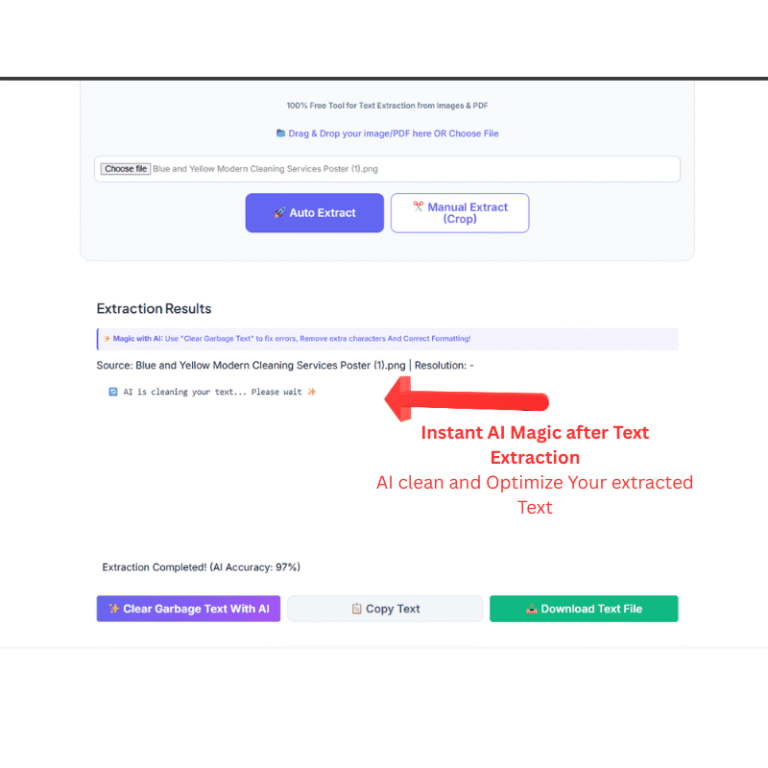
What sets AI Text Toolkit apart from other extractors? it is our advanced post-processing capability. After the initial extraction, you can use our built-in AI Clean feature to instantly eliminate garbage characters, broken symbols, and formatting errors that often plague standard OCR tools. Once your text is polished, our integrated Smart Editor allows you to modify and refine the content directly on the page. This seamless workflow is a unique feature you won’t find on most other websites.
Pro-Tips for 99% Extraction Accuracy
Ensure your image or PDF has good quality and good contrast and ensure the text is clear. Dark or blurry images may lead to errors. For the best results with our Free AI Image PDF to Text Extractor, use high-contrast images to achieve 99% accuracy.
Where Can You Use This AI image pdf to Text Extractor?
The versatility of a high-performance AI Image PDF to Text Extractor makes it an essential tool for almost every digital workflow. At Text ToolKit, we have optimized our OCR engine to serve a wide range of professional and personal use cases with 97% accuracy. Here is how you can leverage our technology to save hours of manual data entry:
Digitalizing Corporate Documents: Businesses often deal with physical paperwork, scanned receipts, and printed invoices. Instead of retyping everything, you can use our AI Image PDF to Text Extractor to instantly convert these static documents into searchable and editable digital files. This is perfect for maintaining digital archives and organizing office records efficiently.
Academic Research and Study Material: Students and researchers frequently find valuable information in textbook screenshots or library PDFs that are locked as images. By uploading these files to our system, you can extract the exact text you need for your assignments, thesis, or presentations within seconds. It eliminates the struggle of copying long paragraphs from non-editable sources.
Data Entry and Spreadsheet Automation: Handling large data tables found in image files or complex PDF layouts can be a nightmare. Our tool allows you to extract rows of data from screenshots and paste them directly into Excel or Google Sheets. This automation reduces the risk of human error and significantly speeds up your data processing tasks.
Social Media Management: Content creators often need to save quotes from Instagram stories, captions from Pinterest images, or text from Twitter screenshots. Our AI Image PDF to Text Extractor helps you grab that text instantly, allowing you to repurpose viral content or save important information for your next post without any hassle.
Legal and Financial Record Keeping: Lawyers and accountants often work with old scanned documents that are difficult to navigate. Converting these images into clear text makes it easier to search for specific keywords or clauses, making legal research much more streamlined and productive.
Extracting Contact Information from Ads: Found a great service on a digital banner or a flyer? Instead of typing out the email addresses, phone numbers, or URLs, simply take a screenshot and let our AI Image PDF to Text Extractor do the work for you. It’s the fastest way to save business leads and contact details directly from visual advertisements.
You’re Privacy, Our Priority
Unlike other online converters, AI Text Toolkit operates on a zero-log policy. Your uploaded images are processed in real-time and are Never stored on our servers. Once you close the tab, your data is gone forever—no registration, no tracking, just pure utility.
Why Our Tool is better than others?
Most online OCR tools are cluttered with intrusive ads and require hidden subscriptions. Our AI text extractor is built on a User-First philosophy. We use a combination of Tesseract and proprietary AI models to ensure that even low-quality images are converted into high-quality text. Whether it’s a png/jpeg text extractor need or a complex ai pdf text extractor task, our tool handles it without compromising your data privacy.
Frequently Asked Questions (FAQs)
Q1: Is the AI Image PDF to Text Extractor completely free to use?
Yes, our AI Image PDF to Text Extractor is 100% free for all users. Unlike other premium tools, we do not require any registration, credit card details, or hidden subscriptions. You can upload and process as many files as you need without any daily limits.
Q2: How accurate is the text extraction from blurry or low-quality images?
At Text Toolkit, we use a high-performance OCR engine that delivers up to 90% accuracy even on standard quality scans. For the best results, we recommend using high-contrast and high quality images and pdf. However, if there are minor errors, you can use our unique AI Clear garbage feature to instantly polish the results.
Q3: Can I extract text from multi-page PDF documents?
Absolutely! Our AI Image PDF to Text Extractor is specifically engineered to bridge the gap between static visual data and editable text. Simply select the PDF category from the dropdown menu, upload your document, and our system will process the content while maintaining the original formatting of your file.
Q4: Is my uploaded data secure on your servers?
Privacy is our top priority at AI Text Toolkit. We operate on a strict zero-log policy, meaning we never store your images or the extracted text on our servers. Your data is processed in real-time and is permanently deleted the moment you close your browser tab.
Q5: What makes this tool different from other online OCR converters?
Most tools only provide raw, messy text. Our AI Image PDF to Text Extractor offers an all-in-one workflow where you can extract, clean, and edit your text within a single interface. With our Smart Editor and Clear Garbage features, you get a professional-grade output that is ready for immediate use.