

Text Extraction Techniques, Methods & Tools: The Complete Guide
Text Extraction Technique, Methods and Tools is important At some point, every business, student and content creator has to deal with the issue of important information that is locked up somewhere where it is hard to access, whether in a scanned invoice, a screenshot, a PDF or a chaotic log file. Extracting that information in an easily accessible format that can be edited is the essence of text extraction.
However, “text extraction” is not a single entity. It encompasses a variety of text extraction techniques, approaches and tools, from an easy online tool that can extract text from a photo in seconds, to enterprise-level software that is capable of automatic processing of thousands of invoices. This article discuss how text extraction works, the main text extraction Techniques and methods to know, and what text extraction tools work for, whether you are extracting a single screenshot or automating an entire document workflow.
Text Extraction: What is it?
Text extraction involves the ability to selectively retrieve text from a given source (a scanned document, image, PDF, webpage or a block of unstructured data) and make it readable, searchable, editable or usable for further processing. Rather than leaving information in a picture or in a wall of unformatted text, extraction makes it accessible to a person or a system.
A couple of similar terms that can be confused:
Text extraction VS text Mining: Extracts specific, defined information like name, date, complete paragraph. Text mining takes it one step further, looking at a lot of text data extracted and patterns such as whether customers are more likely to be happy or unhappy with the product from their reviews.
Text extraction VS summarization: Extraction mean returns the actual content in usable form. Summarization involves bringing the points of a long document together in a concise form, but is still readable.
It is important to be aware of this distinction because it helps determine the appropriate text extraction techniques and tools for the task.
Manual vs. Automated Text Extraction.
Traditionally, text extraction involved manually retyping content. Prior to the advent of technology, this process of extracting text would require someone to sit down and retype the content by hand. There are advantages and disadvantages to that. however, which remain:
- It is slow. Typing a single page takes a few minutes, but hours or days if you have a stack of documents!
- It is error-prone. Large volumes of text create typos, skipped lines and varying formatting, resulting from fatigue and repetition.
- It does not scale. This is easily extracted using a single hand. There are not hundreds or thousands of documents that are.
The automated text extraction methods address all three challenges by employing software to detect, read and print the text, instead of the humans. This is where much of the fascinating techniques and tools are involved, and it is where the rest of this guide is going to be dedicated.
Core Text Extraction Techniques
The techniques used for text extraction are not one-size-fits-all: the correct techniques will vary based on the type of source. The most common techniques are listed below.
Optical Character Recognition (OCR) Text Extraction Technique
OCR stands for Optical Character Recognition and is the method of extracting text from images, whether they are a scanned document, a screenshot of a computer screen or a photo of printed text. It is based on the shape of the characters in an image and it compares it to a set of letterforms, effectively turning pixels into machine-readable text.
Although the early versions of OCR were prone to error, modern OCR has progressed well since then. Older OCR systems struggled with a variety of real-world scenarios, such as low lighting, odd fonts, photos that are tilted or screenshots with overlapping elements. Today, AI-powered OCR systems handle a lot more diverse real-world scenarios, including low lighting, odd fonts, and photos that are tilted or screenshots with overlapping elements — much better than older systems were capable of.
Ideal for: Pictures, scanned PDFs, screenshots, and anything that does not have text in digital, selectable format.
Natural Language Processing (NLP) Text Extraction Technique
NLP based extraction is the analysis of meaning and structure of text rather than the recognition of characters. It’s applied for extracting particular information from unstructured text such as a name, date or location from a paragraph of free-form text.
Suitable for: Scraping data from lengthy sections of unstructured text, like emails or contracts.
Machine Learning-Based Text Extraction Technique
The machine learning models are fed examples of documents, and learn to identify patterns fine-grained enough to be transferable to new documents — even documents with different layouts from the training set.
Best for: When you have a large volume of documents that have widely different formats, such as hundreds of different vendors’ invoices.
Rule-Based Pattern Matching Text Extraction Technique
It uses pre-defined rules or patterns to find specific text, such as always extracting the text following the label ” Invoice Number:”. Easy to understand, easy to predict, and training-free, but does become brittle with changing document formats.
Ideal for: Document types that are consistent and predictable in terms of structure and location of the fields.
Regular Expressions (Regex) Text Extraction Technique
Regex goes one step further by specifying the flexible pattern using a precise syntax, and it will capture whatever text it finds that looks like an email address, phone number or date format, no matter what is on either side.
Ideal for: Structured data points like emails, phone numbers, IDs, within text that can have slight formatting differences, but typically has the same basic structure.
Template-Based Extraction Text Extraction Technique
Template-based tools can be set up to look for a specific and fixed document format (for example to extract text from the exact same coordinates or fields each time). This is useful when all the documents that are being processed contain the same structure.
Ideal for: Documents, such as a single company’s standard order form, that are used repeatedly and have a fixed format.
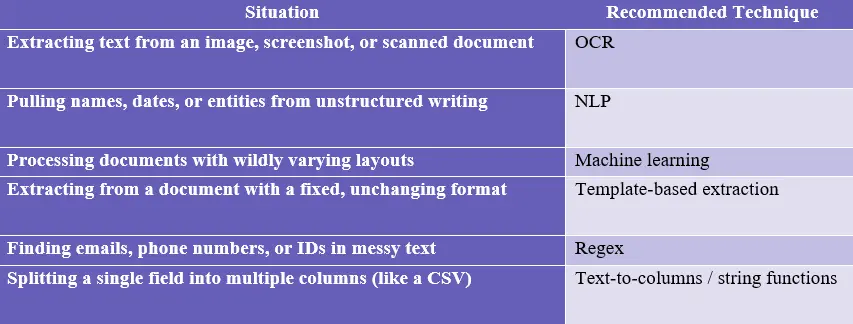
Choosing the Right Text Extraction Technique
With so many text extraction Techniques and methods available, picking the right one comes down to two questions: what’s your source material, and how consistent is its format?
Text Extraction Tools: What's Available
Text extraction tools are typically either generic or specific, depending on who they are targeted at.
Simple, free online tools (For Everyday Use)
A light-weight browser-based OCR tool is typically the quickest solution for extracting text from an image, screenshot or scanned document. Usually no sign-up, no installation and no technical expertise is needed, just upload a file and receive text in seconds.
AI Text Extractor is an example of this type. It works for extracting text from poster, screen shots and scanned documents, accepts JPG, JPEG, PNG and PDF files, and has a cleanup function to correct garbled characters after extraction and all without the need for an account. You can also Extract Signature from any image or PDF
Ideal for: Students, freeware enthusiasts, and those who want to extract text from a single file, without installing software or subscribing to anything.
Enterprise Document Automation Platforms
For enterprises managing large volumes of documents, such as invoices, receipts, contracts, order confirmations, and more, specialized automation systems like Parseur, Nanonets, and Docparser use OCR, machine learning, and rule-based logic to automatically extract data from the documents and then send it to spreadsheets, CRMs, or other business applications.
Ideal for: Companies that regularly extract data from hundreds or thousands of documents and require the extracted data to be pushed immediately into another system.
BI and Spreadsheet-Level Extraction
When using these types of applications, a team working inside a spreadsheet or BI application may extract text from existing data tables, using built-in spreadsheet or BI application functions, such as string functions, regex formulas, and text-to-columns features.
Use case: Analysts who need to clean and restructure already tabular, digital text (e.g. splitting a combined “Name / Email / Role” column into three separate ones).
Real-world applications of text extraction.
The techniques and tools for text extraction appear in many surprising contexts:
Students and researchers taking screen captures of lecture slides or textbook pictures to study from.Students and researchers making screen shots of lecture slides or pictures of the textbook to study.
Small businesses replacing paper receipts and invoices with digitization. . Real estate teams automatically importing lead data from listing website. Contractual teams discussing the need for specific aspects to be extracted from contracts and statements. Users saving and reusing content from text taken from a screenshot of a post, caption, or message from social media platforms. Data analysts cleaning and re-structuring messy log files or free-form text fields to report on
Frequently Asked Questions
What is the difference between text extraction and OCR?
OCR is one type of text extraction method—the one that would be employed to extract text from images and scanned documents. The term text extraction is used for techniques such as OCR, NLP, regex, machine learning and applied to different types of sources.
What method of text extraction is the most correct?
The accuracy is crucially reliant on source material and technique match. OCR is very accurate when you have clear images or scans, while those based on machine learning generally work best on documents with a variable or inconsistent layout, as they learn the layout and can do so without using a particular template.
What about paying to use a text extraction tool?
Not necessarily. If you are doing a one-off, single file extraction, such as taking a few lines from the same screen shot or page scanned from a document, then you will not need to use anything other than a free online tool. For large volumes of documents being processed routinely, it makes more sense to use paid enterprise grade platforms.
Are text extraction tools capable of extracting text from handwritten documents?
There are some more sophisticated tools that can do this, but the results of accuracy for handwriting are less than that of printed or typed text, where there is a more predictable shape to the characters.
What file types can typically be used for text extraction?
Most of the tools will work with common image formats such as jpg and png, as well as with PDF files. A few enterprise platforms also have the ability to pull text directly from e-mail and other document formats.
Final Thoughts
However, there is no one size fits all text extraction Technique and method; it depends on the type of source you are reading the text from, and how frequently you need to extract text from it. If you just want to extract text from a single image or a scanned page, you can use a free AI Text Extractor that can be used without signing up, and it will extract the text in seconds. If you are looking to process a large volume of documents on a regular basis, a comprehensive automation platform with OCR, machine learning and rule-based extraction is likely the more cost-effective choice.
Knowing all the methods, techniques and tools available for text extraction, not just the one you have heard of first, will help you to select the one that is best for your specific context