

Signature Extractor from Image: The Complete Guide to Digitizing Handwritten Signatures
Handwritten signatures still carry real weight in a digital-first world. Banks, law firms, HR departments, and freelancers all need a reliable way to pull a signature off a scanned page or a photo and turn it into a clean, usable digital asset. That is exactly what a signature extractor from image does, and once you understand how it works, you will wonder how you ever managed paperwork without one.
What is Signature Extractor?
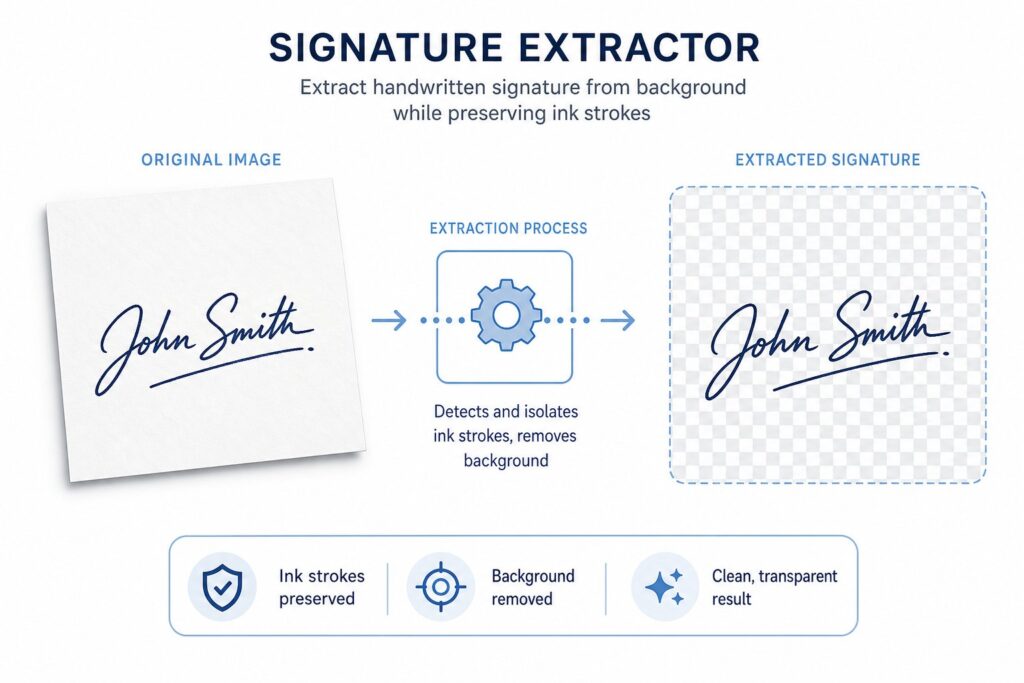
A Signature Extractor from Image is a computer program that extracts signatures from digital images. This type of tool relies on computer vision or machine learning and will recognize the signature area of a scanned image or photo, separate the image from the background and surrounding text, and save the image as a separate image file. The software quickly removes the background in seconds without the need to edit a picture in an editor and deal with an untidy background. A good signature extractor from an image should save you the trouble of opening up Photoshop just to cut off the white background around a scrabble.
A need for such a tool typically arises when a person is required to sign a contract, form or email signature block with a “digital signature”. Many of us don’t sign on a tablet or stylus, but sign on paper, then take a photo and we need that image cleaned up. This is where a quality signature extractor from image can be absolutely essential, Try this Now for Free:
Why Signature Extractor from image?
This is a type of solution that people are forced into, in a number of common situations:
- Often freelancers and consultants need a particular signature stamp for their invoices and proposals, and use it to generate a clear PNG image that they can use over and over again.
- HR and legal teams who are signing hundreds of forms must have a quick means to request and capture signatures for verification or record keeping.
- Students and teachers often need to use a signature extractor from image to complete digital maintenance of signed permission slips or certificates.
- Small businesses making email footers that have a personal touch employ the same type of tool to give otherwise dull digital correspondence a personal touch.
In all of these instances, the issue is the same a signature is on a piece of paper and someone must get a clean, background-free copy of it quickly.
How does the Signature Extractor From Image Actually Work?
Though the algorithms vary from Tool to Tool, a typical tool of this type will go through a standard sequence of steps.
Step 1: Image Preprocessing
The software will have to perform input cleaning prior to any extraction. This encompasses brightness and contrast adjustments, noise removal in poor quality scans and skewed or rotated pages. It’s an important stage to which a good signature extractor from image will pay close attention, as even with high-end detection models, bad preprocessing will produce bad extraction.
Step 2: Signature Detection
This is the core of the overall process. The software can detect regions that show resemblance with handwritten strokes, using edge detection, contour analysis or trained neural networks, and can skip those regions when deciding to copy the document. With thousands of signature images, the advanced platforms are trained using deep learning models, which makes it very easy to accurately distinguish a signature from a stamp or logo or any stray ink marks by using a modern extraction tool.
Step 3: Background Removal
After the signature area is identified, the next step is to remove all the elements except the signature: lines, watermarks, paper texture, and shadows. The result is frequently a clear PNG to which the signature can be overlaid on any kind of paper or electronic form without a box around the signature.
Step 4: Export and format optimization
Lastly, the tool will output the cleaned output in an usable format. The most popular is PNG with transparent background, but some tools also provide SVG (for scalability) and JPEG (for smaller files).
Features for Signature Extractor from image
When choosing a signature extractor from image, make sure it has the following features:
- Always include the ability to return a transparent PNG signature: A good signature extractor from image should always return a transparent (PNG) signature, and should always include the option to return a transparent signature.
- Batch upload: If dealing with multiple documents, consider batch upload functionality, as it can save a ton of time on repetitive tasks.
- Even on poor-quality scans, you’ll want high accuracy: If you’re dealing with real-world documents, these are rarely perfectly lit or flat, so you’ll want the best tools to take into account shadows, creases, and low resolution.
- Color and thickness adjustment: Some platforms can then adjust the color or stroke thickness of the inks after being extracted, a nice bonus feature.
- Privacy and security: Signatures are personal data and a reliable provider will disclose how images are stored and disposed of.
- Speed is a factor that no one wants to endure for one crop. A tool that responds, should respond in seconds, not minutes.
Steps of using Signature Extractor from Image
This is a general outline of what you can expect to do with most online or app-based tools:
- Take a picture or scan of the document. Use a flatbed scanner for the best input if available, or a well-lit photo of the phone with a new signature extractor from image will work.
- Upload the image. The majority of Signature extractor from image Tools will allow you to upload JPEG, PNG or PDF files directly to the program.
- Allow the tool to recognize the signature. The program will automatically mark or cut the region being detected.
- Check and fine-tune crop. No matter how good an extraction tool is, it’s always worth checking it manually for speed, particularly if there are more than one signature on a page.
- Select your export options. Choose clear background, file type and resolution.
- Print out your clean signature. Now you have a reusable digital asset for contracts, emails or design job.
Common Use Cases: more than simple digitization
The aim with the primary purpose is simple digitization, but the use of a signature extractor from image is a lot more than that.
- This feature may be integrated into the upload process of the e-signature platform, allowing users to upload a picture of their signature rather than using a mouse or touch pad to draw one out.
- Extracted signatures are used in graphic design for branding, certificates, and custom-made products.
- This type of extraction is used by archivists and historians to preserve and catalogue samples of handwriting from old letters or historical documents for research purposes.
- A reliable extraction pipeline is a small component of a larger system that is designed to prevent fraud, with the ability to match extracted signatures with a database of known samples.
Tips for Getting the Cleanest Results
Even the most advanced signature extractor from image works best when you give it good source material. A few practical tips:
- Sign in dark ink on plain white paper whenever possible; high contrast makes it far easier to separate strokes from background.
- Avoid shadows falling across the signature when photographing it, since uneven lighting is one of the most common causes of poor extraction.
- Flatten the paper completely; creases and folds can confuse edge-detection algorithms inside the software.
- If your first result looks rough, try increasing the photo resolution or scanning at a higher DPI before running the image through the tool again.
Is It Safe to Use an Online Signature Extractor From Image?
Security is a fair concern, since a signature is a piece of personal identity. Reputable providers typically encrypt uploads in transit, process images temporarily, and delete files after a short retention window. Before trusting any web-based tool with your documents, it is worth checking the privacy policy, particularly if you are handling signatures on behalf of clients or a company rather than just your own. Signature extractor from AI text Extractor is the best and reliable Tool.
For highly sensitive documents, some organizations prefer an offline or self-hosted setup, where the image never leaves an internal server rather than being uploaded to a third-party platform. This is common in legal and financial industries where data handling rules are strict, and it is one more reason careful teams evaluate a provider before uploading confidential paperwork.
Signature Extraction VS. Manual Editing
Before dedicated extraction tools became common, people relied on general-purpose photo editors to remove backgrounds from a scanned signature by hand. This usually meant zooming in pixel by pixel with a magic wand or eraser tool, trying to preserve thin pen strokes while deleting the white space around them. The results were often inconsistent, with jagged edges or faint gray halos left behind wherever the background was notfully transparent.
A Signature extraction tool skips all of that manual fiddling. Because the underlying model is trained specifically to recognize handwriting shapes rather than general image objects, it tends to preserve thin strokes and fine detail far better than a generic background remover. This matters more than it might seem: a signature with broken or blurred lines can look unprofessional on an invoice, or worse, raise questions during a formal verification process. The narrower and more specialized the tool, the better it tends to perform on this specific kind of task.
Choosing Between Free and Paid Options
free signature extractor from pdf or image is best Option, it gives best result and totally Free. Plenty of free tools exist online, and for occasional personal use, a free option is usually enough to get a clean result. However, businesses that process signatures regularly, such as HR departments or notary offices, often benefit from a paid subscription that offers higher accuracy, larger batch limits, and clearer data-retention guarantees. When budget allows, it is worth testing a few different providers with the same sample image to compare output quality before committing to a long-term plan.
Future of Signature Extractor from image
A signature extractor from image solves a small but genuinely annoying problem, turning a physical, handwritten mark into something you can drop into a digital document without a messy background or wasted time in a photo editor. Whether you are a freelancer building a professional invoice template, an HR manager digitizing hundreds of signed forms, or simply someone who wants a personal touch on their email footer, a good extraction tool takes what used to be a fiddly manual task and reduces it to a few clicks.
As detection algorithms keep improving, expect the next generation of extraction tools to handle even messier scans, faster batch jobs, and tighter integration with e-signature and document management platforms. The gap between a crumpled paper form and a polished digital record used to require real design skill; now it just requires the right upload, a few seconds of processing, and a download button. For anyone who signs documents regularly, whether on behalf of a business or just for personal paperwork, keeping a clean, transparent version of your signature on hand is simply good practice, and a dependable tool makes building that asset almost effortless