
Free Text Cleaner Online
Clean and Fix copied Text, Messy Text, AI and Chatgpt Text, OCR & document text instantly. Remove line breaks, symbols, HTML tags, hidden links and more.
Step 1 — Paste Your Text
Any FormatStep 2 — Select Cleaning Options
Quick Presets
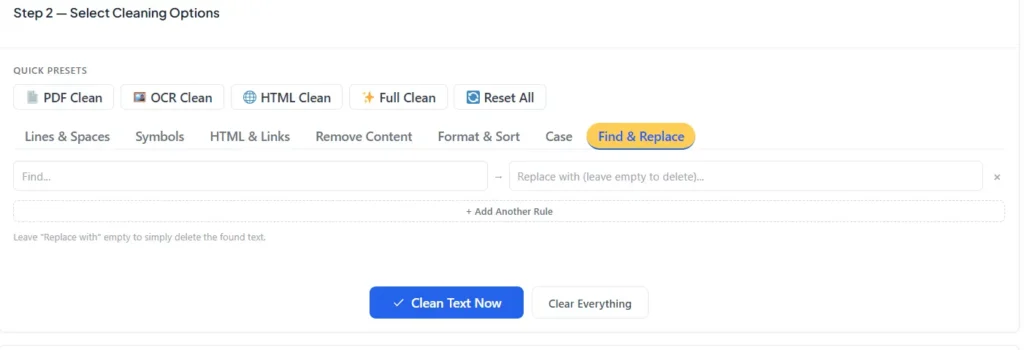
Leave "Replace with" empty to simply delete the found text.
Step 3 — Your Clean Text
Done!Paste your text
Copy text from any PDF, OCR result, website, Word document, or email and paste it into the input box.
Choose options
Select the cleaning options you need — or use a Quick Preset for instant one-click cleaning.
Copy or download
Your clean text appears instantly. Copy it to clipboard or download as a TXT file.
PDF Text Cleaning
Fix broken lines, hyphenated words, and extra spaces that appear when copying text from PDF files.
OCR Text Cleaning
Clean messy output from image-to-text tools — remove ligatures, fix broken words, and eliminate OCR artifacts.
Web & HTML Content
Remove HTML tags, hidden links, script tags, and style blocks from copied web page content.
Email Formatting
Remove unwanted line breaks, extra symbols, and formatting artifacts from copied email threads.
Data Cleaning
Remove duplicate lines, sort lists, number items, and clean text data before pasting into spreadsheets.
Chat & Message Export
Clean exported chat logs by removing timestamps, symbols, and formatting characters.
| Feature | AI Text Extractors ✅ | Generic Cleaners | Manual Editing |
|---|---|---|---|
| 20+ Cleaning Options | ✅ Yes | ⚠️ Basic only | ❌ Manual |
| Quick Presets | ✅ Yes | ❌ No | ❌ No |
| HTML & Hidden Tag Removal | ✅ Yes | ❌ No | ⚠️ Slow |
| Find & Replace Rules | ✅ Multiple | ⚠️ Basic | ⚠️ One at a time |
| Font Selection | ✅ 3 Fonts | ❌ No | ❌ No |
| Before/After Stats | ✅ Yes | ❌ No | ❌ No |
| No File Upload | ✅ Never | ⚠️ Sometimes | ✅ Yes |
| No Signup Required | ✅ Yes | ⚠️ Sometimes | ✅ Yes |
| Works on Mobile | ✅ Full | ⚠️ Partial | ⚠️ Difficult |
Free Text Cleaner Online — Clean Any Messy Text Instantly
Millions of people copy text from PDFs, websites, emails and AI applications such as ChatGPT every single day, and each time, the same annoying issue comes up. Millions of users copy and paste text each day from PDFs, websites, emails, and AI applications like ChatGPT, and every time, the same annoying issue arises. The text is damaged, it is displayed in several short lines, and there are strange symbols and nonprintable characters in the text and formatting such that it cannot be used without ten minutes of manual correction.
A free online text cleaner is capable of eliminating the problem in seconds. Copy and paste your messy text, choose the cleaning options you need, and your text will be perfectly formatted and clean ready to use anywhere.
Here you will find all the tools you need for cleaning text online, fixing PDF copied text, removing ChatGPT formatting, removing HTML tags, and cleaning all kinds of messy text you’ll encounter in your tasks.
What is a Free Text Cleaner Online?
An online text cleaner is a browser based application that will clean out unwanted formatting, invisible characters, broken line breaks, extra spaces, symbols and even HTML code from any text that you paste into it. Imagine it as a filter you feed messiness into it, and clean and readable text emerges out.
The requirement for a text cleaner is a simple one, text does not always pass seamlessly from one application to another. If you copy a paragraph from a PDF, the paragraph will be split into a dozen or more short lines that correspond to the lines of the printed page. If you copy or cut content from a website, you may unknowingly include invisible HTML tags, hidden links and JavaScript fragments. Markdown symbols, asterisks, hidden Unicode characters, and odd spacing may all be present when you paste the results into a document or email, after using AI writing software like ChatGPT.
An excellent online text cleaner takes care of all these as well as in just a single click. You paste the text into the cleaner, click the appropriate checkboxes and voila, the issue is resolved.
What kind of “messy text” can you clean?
There are 5 major areas where people require a text cleaner tool:
The most common usage is probably to copy PDF Text. PDFs contain a page layout system, in which text is stored as small fragments, one line at a time. If you choose a paragraph, or more, of text from a PDF and copy it, your clipboard will contain something like this:
“This is a paragraph from a
PDF file which is scanned and/or photocopied.
The text was copied and pasted into a text file.
editor. This is the end of each line.
You were actually looking for a single sentence. The text cleaner will correct this automatically, replacing all the broken lines, and removing all the fake line breaks added by the PDF.
The most rapidly emerging use case in 2025 and 2026 and ongoing is the use of ChatGPT and AI Generated Text. When you copy text from ChatGPT, Claude, and Gemini or any other AI writing service, the text may be constructed with markdown-style symbols: asterisks around bold text, headings preceded by hash (hashtag), bullets preceded by dashes, etc. These formatting symbols work well in the AI chat window but display as raw symbols in a Word document, email, or CMS. You can use this page to remove all these artifacts without destroying your content with the AI text cleaner.
OCR Text from image-to-text tools may occasionally not convert the words correctly, such as “fi” being joined as one character, or “fl” being joined as a single character. It’s also common for OCR output to include zero-width characters and line breaks in unexpected locations that can affect text matching and searching. Our AI Image to Text tool generates clean OCR output, but when you work with OCR text from other sources, the text cleaner on this page handles every common OCR artifact automatically.
Another common source of messy text is HTML and Web Content. Often HTML tags will appear as real text when copied from a webpage and pasted into a plain text editor, such as <b> and <p> and <div> etc. There are times when a hidden <script> tag appears, or invisible anchor links that were styled to be hidden from the readers, but exist in the HTML code. All of them are completely removed by the text cleaner.
Email Threads and Chat Exports may include inconsistently formatted text, quotation marks, additional line breaks between each sentence, and timestamps throughout. With the right tool, it takes only seconds to clean an exported email thread or chat log for use in a document.
What makes our Free Text Cleaner Online tool better?
Copying text from a PDF or from a scanned file, from jumbled emails, or from a web page can create messy text with unwanted symbols and random line breaks in today’s digital world. Manual cleanup of this text could be a time consuming and labor intensive task. Our Online Text Cleaner has been designed to clean your raw messy text into perfectly formatted text in a single click.
No daily limits, no hidden fees or costs, no subscription charges: Clean, format and edit as many documents or text passages as you want!
Extra Spaces Removal, Remove Unnecessary Line Breaks, Weird Capitalization Correction, and Remove Non-Standard Symbols: Clean up extra spaces, remove unnecessary line breaks, fix weird capitalization and remove non-standard symbols in one click.
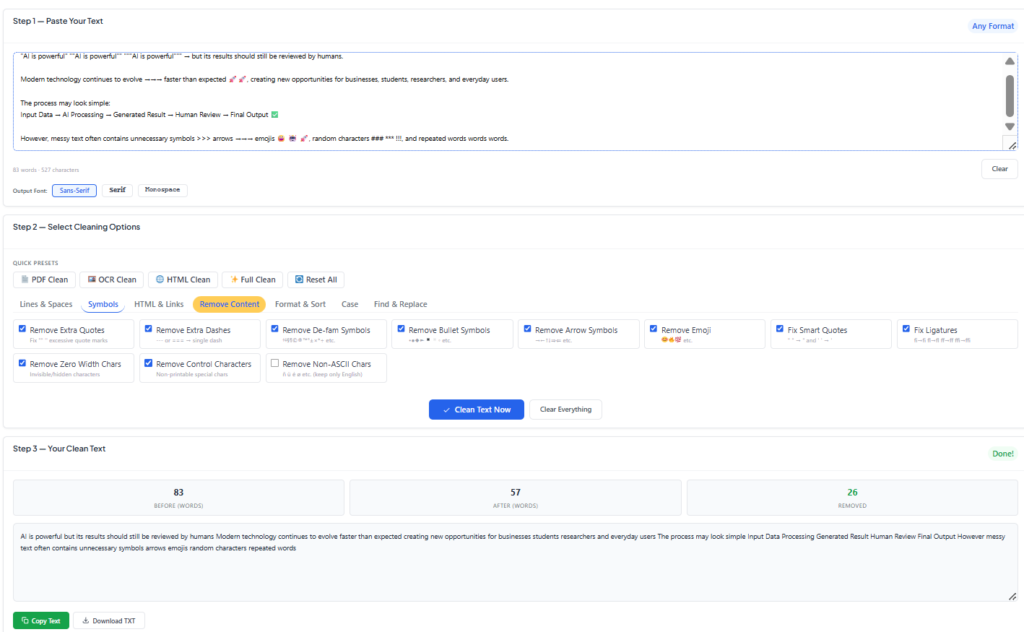
Our Powerful Advanced Text Cleaning Options
With our Online Text Cleaner, you have full control of the way your text is cleaned. Powered by the smart 1-click Quick Presets – PDF Clean, OCR Clean, HTML Clean, and Full Clean – you can quickly transform messy input or use the advanced options below, categorized by type:
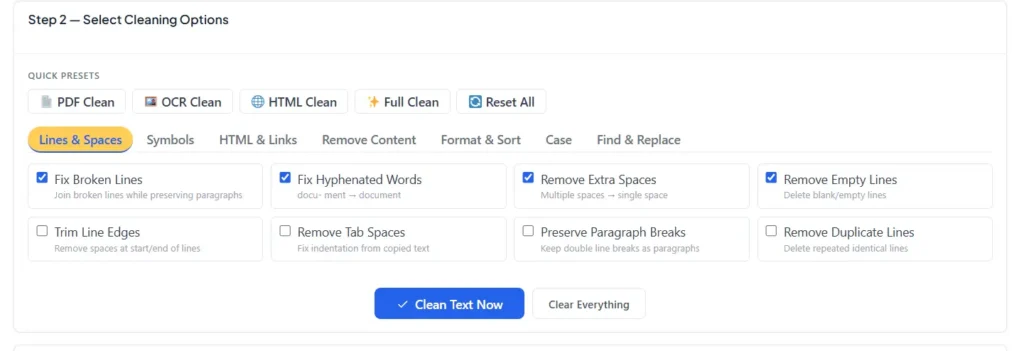
Fix Broken Lines & Spaces: Connects sentences that have been split across lines, but keeps paragraph breaks intact. Recombine the words that are hyphenated (e.g., turns docu-ment into document).Trim off unnecessary spaces and change more than one space into one space. Get rid of all blank lines or empty lines in your text. Removes leading and trailing spaces in the first and last line of each paragraph. Corrects unwanted spacing and tabbing from other documents.
Symbols: Remove unwanted typographic noise, smart quotes, random punctuation, accents or special symbols pasted from PDFs and foreign language web pages.
HTML & Links: Remove HTML tags, hyperlinks, clean up raw HTML snippets, and extract plain text from formatted HTML web documents instantly.
Remove Content: Target and remove one or more elements in your document such as numbers, emojis, emails, URLs, punctuation, and more.
List Format and Sort: Reorder and sort texts (alphabetically, numerically, reverse line order or uniform list bullet points).
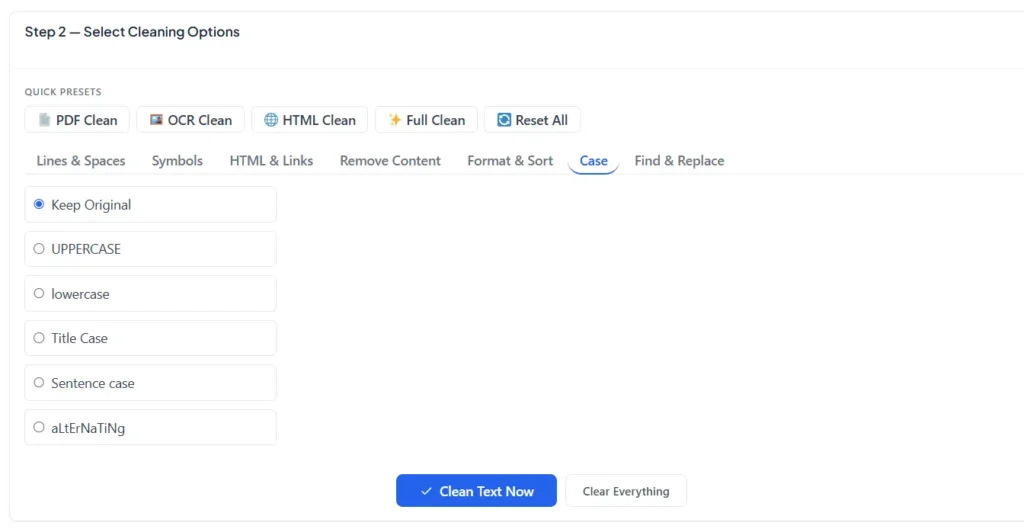
Case: Convert text to UPPERCASE, lowercase, Title Case, Sentence case or Capitalize Words with a single click.
Locate and Replace: Locate words, characters or regex patterns inside your text and replace them at once without hassle.
Privacy First & Secure: Privacy is our priority. All processing is done locally in your browser, meaning your text will not be stored, saved or sent to any server.
No Installation Required: Smooth running web based tool, without bulky software to be installed, working on any device (desktop, tablet, smartphone).
For Professionals & Students: Perfect for writers, developers, students, researchers and digital marketers who require text for publication in seconds.
From making documents for printing, formatting blog posts, to cleaning up any data that was been entered with a wild mix of punctuation, our tool offers the quickest, cleanest and easiest experience on the internet.
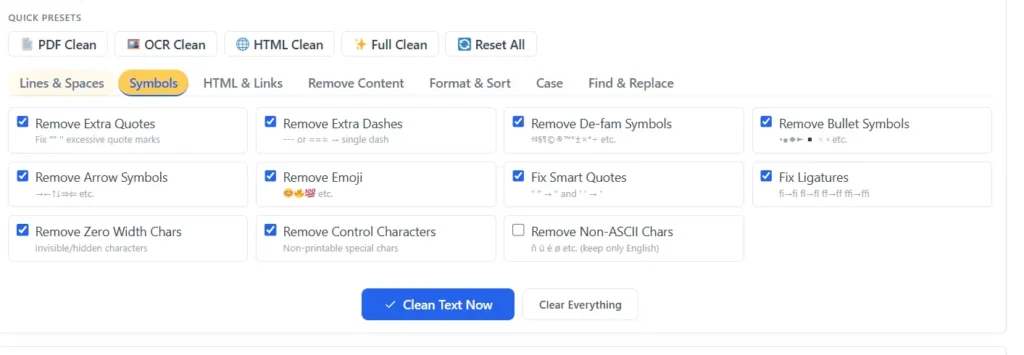
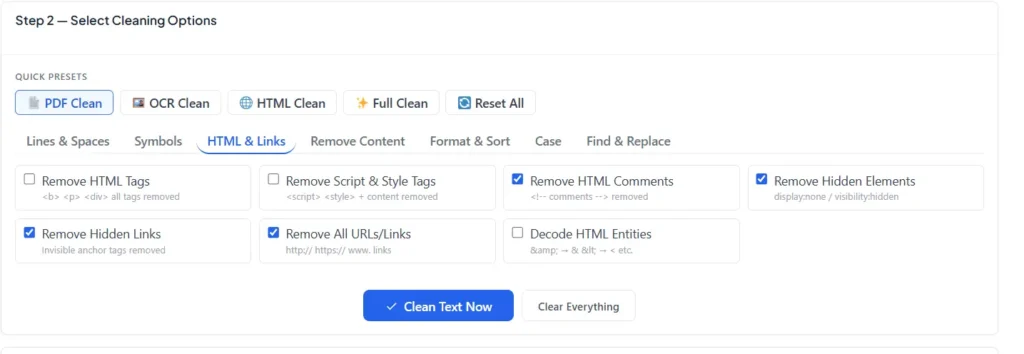
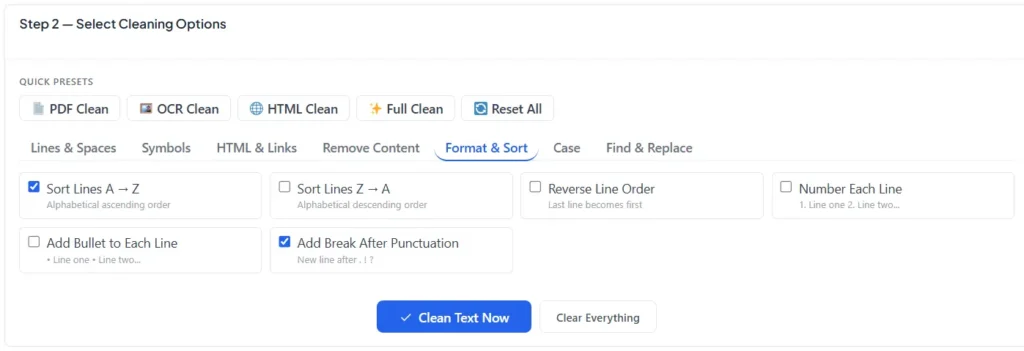
How to Use This Free Text Cleaner Online Step by Step
This is a free online text cleaner that is completed in less than 30 seconds.
Step One: Paste Your Text. Select within the input for the text and paste the text you wish to sanitize with Ctrl + V (Mac: Command + V). Word and character count updates in real-time to ensure you are always aware of what you are working with. It doesn’t have any word count limits, you can paste a single sentence or a long document and it will work for both.
Step Two: Decide how you will clean. The basic options section includes the most often used cleaning tasks: remove line breaks, fix hyphenated broken words, remove extra spaces, delete empty lines, and remove special symbols. All you need for most day-to-day cleaning are the basic variants. If you require greater control, click Show Advanced Options to see the full range of about thirty cleaning options grouped into Symbols and Characters, HTML Tags and Hidden Links, Remove Specific Content, Format and Sort, Text Case Conversion and Find and Replace.
To get even faster results, try one of the four Quick Presets at the top of the options section. PDF Clean automatically picks the suitable options for repairing PDF text copied. Addressing image-to-text artefacts with OCR Clean. HTML Clean removes and resolves entities. Full Clean is a combination of all of the above cleaning options to get the best results.
Step Three: Click Clean Text Now. The cleaning process is instant there is no waiting, no progress bar, no upload. Everything happens locally inside your browser the moment you click the button.
Step Four: Copy or Download Your Clean Text. The clean result appears in the output area below, along with a before and after word count showing exactly how much was removed. Click Copy Text to send the result to your clipboard, or Download as TXT to save it as a plain text file
How to Clean ChatGPT and AI Generated Text?
With the proliferation of AI writing tools in everyday use, the need for a dependable ChatGPT text cleaner has surged in popularity. That is not the quality of the text that ChatGPT writes — that is the formatting artifacts that ride along.
If ChatGPT wants to emphasize a word or phrase, it will enclose it in double asterisks: **like this**. If it forms a heading, it places a hash (#) symbol in front of the heading: ## Like This. The formatting of these markdown codes will appear to look natural in ChatGPT, due to the fact that the interface will render them visually. However, as soon as you copy that text and paste it in to a Word file, a Google Doc, or an email or CMS, the symbols become real characters in your text something that needs to be manually cleaned up before you can use it.
In addition to markdown, there are other invisible characters that are inserted by AI tools that cause subtle issues: text wrapping occurs unexpectedly, search-and-replace fails to return words, etc., and some publishing platforms show small visual glitches where these invisible characters are located.
All this is taken care of by our AI text cleaner. Copy your ChatGPT, Claude, or Gemini response, apply the Full Clean preset, and you’ll get clean, well-formatted plain text without any markdown symbols, no hidden characters, and no invisible artifacts. You can then copy and paste it into any application as is.
Simple text cleaning tools such as textcleaner.net are available for free but don’t include any AI-specific cleaning features, have limited capabilities, and have a dated UI/UX. Created in 2025 to deal with the modern blend of PDF text, AI output and HTML content people work with in 2025 and 2026.
How to Fix Copied Text from a PDF
A common reason for using a text cleaner online is to fix copied PDF text. The problem consists of three parts, the tool takes care of all of them.
The appearance of Broken Line Breaks is caused by PDF layout engines that store text line by line (in the order of the visual layout of the printed page). Each of those visual lines is converted to a text line when you copy and paste. The Remove Line Breaks option will combine them all back into proper continuous paragraphs.
When a long word was broken across two lines in the original PDF layout, such as “docu-” followed by a line break and then the word “ment”, the word will be hyphenated Word Breaks. The Fix Hyphenated Words option identifies these hyphens and restores them to the right word: “document”.
Extra Spaces may be added due to PDF text extraction, which sometimes inserts spaces between words and words in the original layout. The Remove Extra Spaces option will reduce all the sequences of spaces between words to a single space, so that your text will be presented in a clean, naturally-spaced format.
The PDF Clean quick preset will include all three of these options. PDF Clean is used to remove all junk from PDF copies, and for most copying operations, you just need to click PDF Clean and then Clean Text Now.
How to Remove HTML Tags and Hidden Links
When working with web content, such as copying text from web pages, working with CMS exports, or removing tags from the HTML code, you may find that HTML tags appear when you paste in your text, but not when you copy them from a website; or you may find that the HTML code is not visible when you copy it from a website, but is visible when you paste it.
The HTML and Hidden Links part of the Advanced Options contains all the situations:
Remove HTML Tags removes HTML tags from the text like <b> <i> <p> <div> <span> and all others, leaving only the readable text content.
Remove Script and Style Tags does not only remove the tags but the entire content of the <script> and <style> blocks. This is important because script and style blocks can contain hundreds of characters of javaScript or css which would otherwise be garbage text.
Remove Hidden Elements looks for CSS elements that are hidden from readers, but are still present in the source code (display:none or visibility:hidden). Sometimes they are present when copying information from some web pages and pasting in plain text environments.
Remove Hidden Links is created to remove anchor tags that are styled to be invisible. This option will completely block invisible links for tracking, navigation or spam.
Decode HTML Entities will see that & is rendered as &, < as <, as a space, etc.
All these options are checked when using the HTML Clean preset.
Every Cleaning Option Explained
This is a comprehensive tutorial on all the features of this free text cleaner:
- Remove Line Breaks will remove all line breaks between paragraphs and replace them with blank spaces.
- Fix Hyphenated Words finds words with hyphens and merges them into the appropriate single word.
- Remove Extra Spaces will replace sequences of 2 or more spaces with a single space in the text.
- The text is a compact block without any gaps: Remove Empty Lines removes all the empty lines from the text.
Note that Preserve Paragraph Breaks and Remove Line Breaks work together: If both options are checked, any single line break will be deleted, but any double line break that indicates a new paragraph will be retained, and the paragraph structure of the original will be preserved.
- Trim Line Edges will trim off spaces or tabs at the very start or end of each line.
- Remove Duplicate Lines removes the first occurrence of any line that occurs more than once in the text, leaving no duplicates after the first, thus making the text short and without repetition.
- Remove Special Symbols: Removes symbols such as daggers, double daggers, section marks, paragraph marks, trademark symbols, degree signs and similar characters which are commonly used in academic/legal documents but are unnecessary in plain text.
- Bullet Symbols drops the bullets from a list, which may be concealed in text copied from a formatted file (like a word processor) as graphics (filled circles, diamonds, arrows, etc.).
- Fix Smart Quotes turns the “smart quotes” that word processors automatically insert in quotation marks into straight quotation marks that can be used correctly in code, CSV files and many other plain text applications.
- Fix Ligatures fixes certain merged letters that are created by some fonts and PDF renderers (like fi for ‘fi’, ﬓ for ‘fl’, and ff for ‘ff’) back to their individual letter forms.
- You can remove invisible zero-width characters, non-breaking spaces, byte-order mark and other invisible characters in the Unicode set that lead to text matching issues and layout problems by using Remove Hidden Characters.
- Sort Lines A to Z or Z to A sorts all the text lines alphabetically, e.g. helpful in cleaning lines for a list of keywords, name list or any other kind of line-based data list.
- Number Each Line – numbers are added at the beginning of each line – useful when creating numbered lists from unordered text.
- Use Find and Replace to search for and replace any word, phrase or character pattern — or remove it entirely with an empty replacement field. You can use more than one find and replace rule at a time.
Who Should Use This Text Cleaner?
The PDF Clean preset will save students and Researchers a lot of time on each document they write with the text copied from academic PDFs, journal articles, and research papers.
Content Writers and Bloggers who are using AI writing tools such as ChatGPT to generate content will appreciate the AI-specific cleaning capabilities.AI Writers and Bloggers who are using AI writing tools like ChatGPT to create content will find the AI-specific cleaning features useful. Our Content Analyzer Tool can then help evaluate the cleaned content for traffic potential and readability.
More technical options such as removing control characters, stripping non-ASCII characters and applying find-and-replace rules for custom transformations will be used by developers and Technical Users who deal with text data (e.g., processing CSV exports, cleaning API responses, normalizing text before inserting into a database).
HTML stripping and removal of hidden links will be advantageous to any SEO Professional or Digital Marketer who copies content from competitor pages, web archives, or CMS exports for analysis.
Legal and Administrative Professionals who are handling court documents, legal contracts, and official forms frequently will use the OCR Clean preset to correct the output after it is digitized using an OCR tool such as our AI Image to Text Extractor, before filing or editing these documents.
Those Data Analysts who deal with exported data files, logs or lists will find the sorting, removing duplicates, and find and replace options helpful in normalizing and structuring the data efficiently.
Why This Text Cleaner Is Different
There are several text cleaning tools that are available online and most of the basics are covered. There is a difference with this tool, in the depth and privacy.
Most basic text cleaners such as the textcleaner.net feature a few options: usually line breaks and extra spaces get removed, and not much more. They don’t deal with the formatting of ChatGPT, hidden HTML links, zero-width characters, ligatures, or any of the more esoteric issues that a contemporary text cleaning needs to address.
It includes over 30 individual cleaning options in logical groups, 4 quick presets for the most common scenarios, a font selection for the output, before/after word count statistics, and a before and after Find and Replace which can have multiple rules applied at once.
More importantly, everything is run locally within the browser. No one else reads your text and your text is never uploaded on any server, stored in any database. This can make all the difference for legal papers, private documents, and personal content. No account needed, no daily limit, no watermark on output and no limitation on processing amount of text in one time.
Related Free Tools on AI Text Extractor
These other tools on this site will be helpful if you often need to work with text from documents and images:
The AI Image to Text Extractor converts any image or scanned document to editable text using OCR and the text cleaner on this page is the perfect next step for cleaning that extracted text before use.
The Free Signature Extractor from PDF and Images extracts handwritten signatures from scanned documents and delivers a transparent PNG useful for anyone working with signed contracts and agreements.
The AI Content Analyzer evaluates any text for traffic potential, gender appeal, readability, and emotional tone ideal for checking content quality after cleaning it with this tool.
The PDF to Text Extractor converts entire PDF documents directly to plain text and again, the text cleaner handles any formatting issues in the extracted output
Start Cleaning Your Text Right Now
Messy text is one of those small but genuinely time-consuming problems that adds up to hours of wasted effort every week. Whether you are fixing a copied PDF, cleaning ChatGPT output before publishing, stripping HTML from web content, or normalizing a list of data, this free text cleaner online handles it instantly, privately, and without any restrictions.
Paste your text above, choose your options, and click Clean Text Now. No account. No upload. No limit. Clean text in seconds.